Capacity Planning Process: A Step-by-Step Guide for Teams



TL;DR:
- Capacity planning matches team resources with forecasted demand to avoid burnout and missed deadlines.
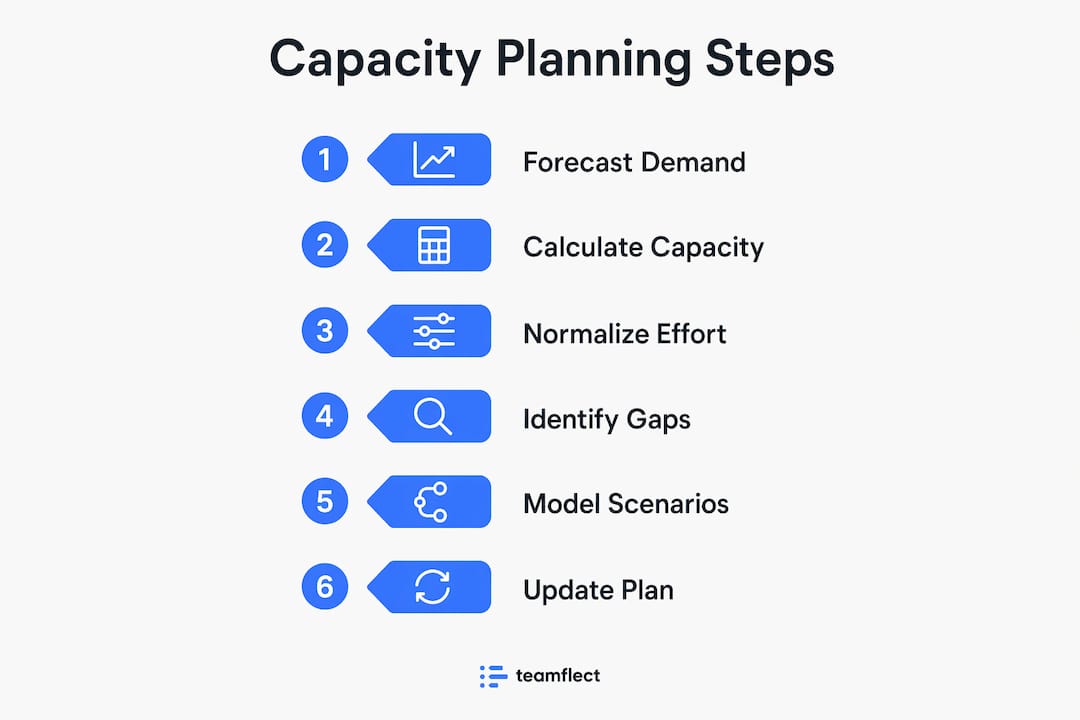
- Effective processes involve forecasting demand, calculating capacity, normalizing effort, identifying gaps, and continuously adjusting plans.
The capacity planning process is the practice of matching your team’s available resources against forecasted demand to deliver projects on time without burning people out. The industry-standard cycle runs 5–6 repeating steps, from demand forecasting through continuous monitoring, and planning windows typically look 6–12 months ahead. Done well, it replaces reactive fire-fighting with decisions made weeks before a bottleneck hits. This guide walks through each step, the techniques that make them work, and the mistakes that quietly wreck even well-intentioned plans.
What are the essential steps in a capacity planning process?
The capacity planning process follows a repeatable cycle. Each step feeds the next, and skipping one corrupts the output of everything downstream.
-
Forecast demand. Gather every confirmed project, likely pipeline deal, and recurring operational commitment for the next 6–12 months. Include work from every team, not just the ones with formal project managers. Incomplete demand lists are the single most common reason plans fail on day one.
-
Calculate available capacity. Start with raw headcount hours, then subtract planned leave, public holidays, training days, and recurring meetings. Non-project tasks consume 20–40% of team capacity on average. That figure means a 10-person team effectively operates as 6–8 people for project work.
-
Normalize demand into consistent effort units. Translate all work into one measure, whether story points, estimated hours, or t-shirt sizes. A sprint bug fix and a multi-month platform migration cannot sit in the same forecast without a common unit. Mixing granularities corrupts forecast accuracy and makes gap analysis meaningless.
-
Identify gaps. Compare total normalized demand against available capacity. Flag every period where demand exceeds supply. This is where the plan earns its value: a visible gap six months out is a hiring decision; the same gap discovered two weeks out is a crisis.
-
Adjust commitments. Resolve gaps through reprioritization, shifting resources across teams, phasing delivery dates, or initiating hiring. The goal is not a perfect plan. The goal is a plan everyone can actually execute.
-
Monitor and refine continuously. Track actual delivery against the forecast every two to four weeks. Static plans become obsolete quickly; iterative cycles keep the plan aligned with real business conditions.
Pro Tip: Build your demand list before you touch capacity numbers. Teams that start with “how much can we do?” instead of “what do we need to do?” systematically underestimate workload and overcommit.
How do you translate demand and capacity into resource plans?
Translating raw demand and headcount into a workable resource plan requires two things: a consistent unit of effort and an honest accounting of what consumes capacity beyond project work.

Standardize your effort units
Every work item entering the forecast needs a size in the same currency. Story points work well for software teams already using agile. Estimated hours work for professional services and agencies. T-shirt sizing works for early-stage pipeline items where precision is impossible. The specific unit matters less than applying it consistently. Standardizing work effort units is the foundation of meaningful gap analysis.
Account for operational load
Operational load is not overhead. It is a first-class consumer of capacity. Meetings, code reviews, incident response, onboarding new hires, and internal reporting all pull hours from the same pool as project work. Teams that exclude these from their capacity model routinely commit to more than they can deliver.
Visualize the gap
A demand-versus-capacity table makes the gap visible at a glance. Here is a simplified example:
| Period | Available hours | Forecasted demand (hours) | Gap |
|---|---|---|---|
| Q1 | 1,600 | 1,400 | +200 (surplus) |
| Q2 | 1,500 | 1,900 | -400 (shortfall) |
| Q3 | 1,600 | 1,550 | +50 (balanced) |
| Q4 | 1,400 | 1,700 | -300 (shortfall) |
A table like this turns an abstract resource problem into a concrete scheduling decision. Q2 and Q4 shortfalls need a response now, not when those quarters arrive.
Model scenarios
Scenario modeling for best-case, worst-case, and most-likely demand triggers early hiring or reprioritization decisions before they become urgent. Run at least three scenarios for any quarter where pipeline conversion is uncertain.
Pro Tip: Reserve 10–15% of your available capacity as a buffer for unplanned work. Teams that plan to 100% utilization have no room to absorb a single unexpected request without breaking something else.
What tools and strategies support effective capacity planning?
The right tools and practices determine whether your capacity plan stays current or collects dust after the first sprint review.
Move away from spreadsheets
Spreadsheet-based planning breaks down when teams grow beyond a handful of people. Centralized planning systems enable proactive what-if scenario planning and faster adjustments when demand changes. A centralized platform gives every stakeholder a single version of the truth, which eliminates the version-control chaos that kills spreadsheet-based plans.
Target 70–80% utilization
Aiming for 70–80% utilization preserves the agility to absorb unexpected work without schedule collapse. Planning to 100% is not ambitious. It is fragile. One sick day or one urgent client request breaks the entire delivery chain.
Include non-human resources
Equipment, budget, and technology constraints must be part of the capacity model. A software team blocked on a cloud environment license or a hardware dependency will miss deadlines regardless of how well-staffed they are. Non-human bottlenecks are real and frequently ignored.
Key practices that separate effective capacity planning from box-checking exercises:
- Centralize demand intake. One place where all project requests and operational commitments land, visible to everyone who plans resources.
- Run what-if scenarios before committing. Test the impact of a new client win or a key person going on leave before it happens.
- Track utilization in real time. Knowing a team is at 95% utilization today lets you act before they hit 110% next week.
- Engage stakeholders regularly. Demand forecasts degrade fast. Weekly or biweekly check-ins with project owners keep the numbers honest.
- Use capacity tracking tools built for teams. Purpose-built platforms surface workload conflicts that spreadsheets hide.
What common mistakes should be avoided in capacity planning?
Most capacity planning failures trace back to a small set of recurring errors. Recognizing them is the first step to avoiding them.
- Planning to full utilization. Teams planned at 100% capacity have zero buffer. One unplanned task cascades into missed deadlines across every project in the queue.
- Ignoring operational load. Excluding meetings, reviews, and support work from capacity calculations overstates available hours by 20–40%. The plan looks achievable on paper and fails in practice.
- Mixing work granularities. Placing a two-week epic and a two-hour bug fix in the same forecast without normalization creates noise. Forecast reliability drops when effort units are inconsistent.
- Ignoring non-human constraints. A team blocked on a software license or a shared testing environment misses deadlines even when headcount is sufficient.
- Relying on static spreadsheets. Spreadsheets cannot run scenarios, cannot alert you when utilization spikes, and cannot reflect real-time changes without manual updates.
Pro Tip: Audit your last three project delays. In most cases, at least one root cause traces back to a capacity planning error: missing demand, ignored operational load, or a non-human constraint nobody tracked.
How can organizations continuously improve their capacity planning?
A capacity plan is not a document you write once per quarter. It is a living process that requires regular attention to stay accurate.
-
Compare actuals to forecasts every two to four weeks. Measure how closely actual delivery matched the plan. Persistent gaps between forecast and reality signal a modeling problem, not just bad luck.
-
Engage project owners for updated demand forecasts. Scope changes, new client requests, and delayed projects all shift demand. Validating plans against actual delivery improves forecast accuracy over time.
-
Track utilization metrics as leading indicators. Utilization trending above 85% for two consecutive weeks is an early warning sign. Act on it before the team hits a wall.
-
Run a retrospective on capacity accuracy each quarter. Which teams were consistently over-allocated? Which demand categories were systematically underestimated? Use those findings to recalibrate the next cycle.
-
Build cross-functional visibility. Operations leads, project managers, and department heads all hold pieces of the demand picture. A centralized planning approach that pulls all stakeholders into one view produces more accurate forecasts than any single team can generate alone.
-
Treat the process as a skill, not a task. Teams that practice capacity planning regularly get better at it. Estimation accuracy improves, stakeholder trust grows, and delivery predictability increases with each cycle.
Key takeaways
A disciplined capacity planning process is the difference between proactive resource management and constant reactive scrambling.
| Point | Details |
|---|---|
| Follow the 5–6 step cycle | Forecast demand, calculate capacity, normalize effort, identify gaps, adjust, and monitor continuously. |
| Account for operational load | Non-project work consumes 20–40% of capacity; exclude it and your plan will overcommit every time. |
| Target 70–80% utilization | Keeping a buffer preserves agility and prevents schedule collapse when unexpected work arrives. |
| Standardize effort units | Consistent units like story points or estimated hours are required for accurate gap analysis. |
| Move beyond spreadsheets | Centralized platforms with scenario modeling and real-time tracking outperform static spreadsheets at any team size. |
Why most capacity plans fail before they start
The uncomfortable truth I’ve learned from watching teams plan and replan the same quarters is this: most capacity planning failures are not tool failures. They are honesty failures. Teams know the operational load is real, but they exclude it from the model because including it makes the plan look bad. They know the pipeline is uncertain, but they plan as if every deal will close on schedule. They know 100% utilization is unsustainable, but they commit to it anyway because saying no to a project feels harder than overpromising.
The fix is not a better spreadsheet or a fancier platform, though both help. The fix is a cultural commitment to planning with real numbers. That means surfacing the operational load even when it shrinks available hours. It means running the worst-case scenario even when the most-likely case looks fine. It means telling a stakeholder that Q3 is already at capacity before they commit a client to a Q3 delivery date.
I’ve seen teams cut their delivery delays significantly just by adding one honest step: subtracting actual operational load before committing to project work. No new tools, no new headcount. Just an honest accounting of where the hours actually go.
The teams that get capacity planning right are not the ones with the most sophisticated models. They are the ones willing to share an uncomfortable forecast and defend it. That takes cross-functional planning discipline more than it takes software.
— Dima
How Teambuilt fits into your capacity planning workflow

Teambuilt is built for exactly the kind of capacity planning this article describes. The platform gives project managers and operations leads a centralized view of team availability, workload, and forecasted delivery dates in real time. You can model what-if scenarios before committing to new work, track utilization against the 70–80% target, and normalize effort across teams without maintaining a dozen separate spreadsheets.
If your current process relies on manual updates and version-controlled files, Teambuilt’s resource planning platform replaces that with live data every stakeholder can trust. Growing teams and agencies use it to catch capacity gaps weeks before they become delivery problems.
FAQ
What is the capacity planning process?
The capacity planning process is a repeating cycle of forecasting demand, calculating available resources, identifying gaps, and adjusting commitments. It typically runs 5–6 steps and looks 6–12 months ahead.
How do you calculate team capacity?
Start with total available hours, then subtract leave, holidays, and operational tasks like meetings and reviews. Non-project work typically consumes 20–40% of capacity, so always subtract it before committing to project work.
What utilization rate should teams target?
Teams should target 70–80% utilization. Planning above that level leaves no buffer for unplanned work and creates schedules that break under the first unexpected change.
Why is normalizing effort units important?
Mixing different work sizes without a common unit, such as story points or estimated hours, produces inaccurate forecasts. Standardizing all demand into one effort measure is required for reliable gap analysis.
What is the biggest mistake in capacity planning?
Ignoring operational load is the most common and damaging mistake. Excluding recurring non-project tasks overstates available hours and causes teams to overcommit on project work every cycle.
Recommended
- Optimize Team Capacity: A Practical Guide for Growing Teams | Teambuilt Blog
- Optimize Team Capacity: A Practical Guide for Growing Teams | Teambuilt Blog
- Explaining Team Capacity Planning for Project Managers | Teambuilt Blog
- Resource planning: optimize team performance and avoid conflicts | Teambuilt Blog