Engineering Workflow Automation: What Teams Need to Know


TL;DR:
- Engineering workflow automation coordinates lifecycle tasks through tooling, process definitions, and artifact traceability to improve project visibility. Governance checkpoints called decision gates ensure automation maintains quality and stakeholder oversight throughout stages. Implementing CI/CD pipelines with standardized templates and traceability links maximizes automation benefits and delivery predictability.
Engineering workflow automation is the structured coordination of engineering lifecycle tasks through specialized tooling and process definitions, reducing manual effort while improving traceability and project visibility. For project managers and team leads, this means replacing scattered, ad hoc processes with a governed system that connects planning, change management, defect tracking, source control, and build execution into a single operational framework. IBM’s Engineering Workflow Management platform demonstrates this in practice, integrating all of these functions to give teams a unified view of progress and release readiness. Understanding what engineering workflow automation actually covers, and how its components interact, is the foundation for any serious effort to improve delivery predictability.
What is engineering workflow automation and how does it work?
Engineering workflow automation is the coordinated use of tooling and process definitions to manage, track, and execute work across the full engineering lifecycle. It is not simply scripting repetitive tasks. The real value lies in connecting artifacts, people, and processes so that changes in one area automatically propagate relevant information to others.
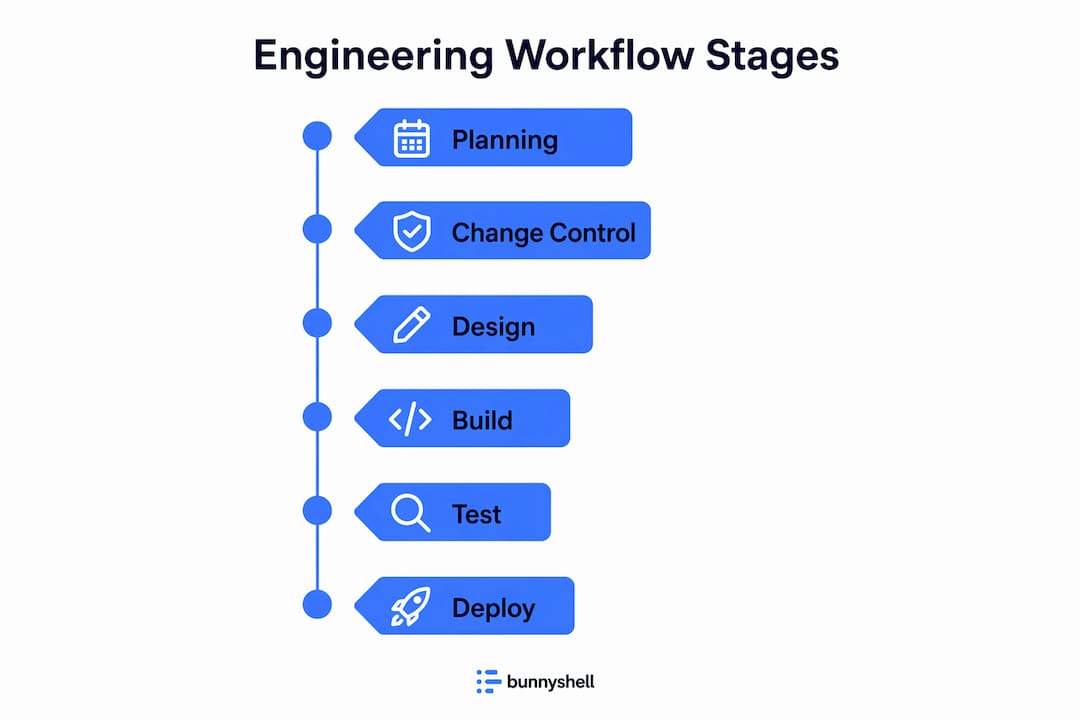
At its core, the engineering workflow process covers six integrated functions: iteration planning, change management, defect tracking, source control, build automation, and reporting. Each function feeds the others. A defect logged during testing links back to the source code change that caused it, which connects to the original requirement, which ties to the release plan. This chain of connections is what practitioners call a digital thread, and it is what separates genuine workflow automation from a collection of disconnected scripts.
Workflow orchestration structures this work into stages and steps. Each stage represents a phase of the engineering lifecycle, such as design, development, integration, or release. Steps within each stage define the specific tasks, approvals, and automated actions required to move forward. This structure gives project managers a clear picture of where work stands at any moment, without having to chase status updates across multiple tools.
Pro Tip: Before selecting any workflow automation tools, map your current engineering process end to end. Identify where handoffs break down and where status information goes dark. Those gaps are your highest-priority automation targets.
What are the key components of engineering workflow automation?
The components of engineering workflow automation work as an integrated system, not as independent modules. Understanding each one helps project managers decide where to invest first and how to sequence adoption.
- Iteration planning organizes work into time-boxed cycles with defined goals, making it possible to forecast delivery dates based on actual team capacity rather than optimistic estimates.
- Change management tracks every modification to requirements, designs, or code, creating an auditable record of why decisions were made and who approved them.
- Defect tracking connects bugs and issues directly to the builds and code changes that introduced them, cutting the time engineers spend diagnosing root causes.
- Source control management (SCM) provides version history and branching strategies that support parallel development without losing traceability.
- Build automation removes manual steps from the compilation and packaging process, producing consistent, repeatable artifacts for testing and deployment.
- Reporting and dashboards surface progress metrics, quality indicators, and release readiness signals in real time, giving decision-makers the data they need without manual aggregation.
The cross-artifact traceability enabled by platforms like IBM’s Engineering Lifecycle Management suite uses OSLC (Open Services for Lifecycle Collaboration) technology to link requirements, tests, code, and defects across tools. This means a project manager can trace a customer requirement all the way through to the test cases that verify it and the build that delivered it. That level of visibility is what makes engineering process optimization meaningful rather than cosmetic.
Workflow automation’s highest value comes from enabling this traceability and integrated planning, not from automating individual tasks in isolation. Teams that automate task execution without connecting artifacts end up with faster chaos rather than better outcomes.
How do decision gates and governance influence engineering workflow automation?
Decision gates are stakeholder checkpoints placed at the transitions between lifecycle stages. They are the mechanism that keeps engineering workflow automation from becoming a runaway process where work advances without adequate review or approval. According to the SEBoK Generic Life Cycle Model, decision gates give stakeholders three explicit options at each stage boundary:
- Proceed to the next stage because the work meets the defined exit criteria.
- Remain in the current stage to address gaps, defects, or incomplete deliverables.
- Terminate or re-scope the effort if the project no longer aligns with business objectives or technical feasibility.
This governance structure is not optional overhead. It is the control layer that makes automation trustworthy. Without decision gates, automated pipelines can push incomplete or low-quality work forward simply because no human checkpoint exists to stop it.
“Decision gates provide necessary governance controls in automated workflows, balancing automation with quality assurance and stakeholder oversight.” — SEBoK on Lifecycle Governance
Integrating decision gates into automation workflows means configuring stage transitions to require explicit approvals before triggering downstream processes. A build that passes automated tests does not automatically deploy to a staging environment. It waits for a designated reviewer to confirm that the quality bar has been met. This preserves the speed benefits of automation while maintaining the accountability that project managers and compliance teams require. For teams managing complex workflow orchestration, this balance between automated execution and human oversight is the defining design challenge.
What role do CI/CD pipelines play in engineering workflow automation?
CI/CD (Continuous Integration and Continuous Delivery) pipelines are the execution engine of engineering workflow automation. They automate the steps between a code commit and a deployable artifact, removing the manual packaging, environment setup, and deployment coordination that historically consumed engineering time and introduced inconsistency.

| Pipeline capability | Manual approach | Automated approach |
|---|---|---|
| Package definition | Engineer manually specifies build inputs each release | Pipeline reads standardized build config automatically |
| Test environment setup | Ops team provisions environments on request, often days ahead | Environments provisioned on demand per pipeline run |
| Environment recycling | Environments persist and accumulate configuration drift | Environments torn down and rebuilt fresh after each test run |
| Deployment metadata | Tracked in spreadsheets or release notes | Captured automatically as pipeline artifacts |
Dynamic environment provisioning is one of the most impactful practices in CI/CD pipeline strategy. IBM’s pipeline guidance recommends capturing deployment metadata and recycling fresh execution environments for every test run. The reason is environment drift. When test environments persist across multiple runs, they accumulate configuration changes, leftover data, and dependency updates that were never part of the original setup. Test results from a drifted environment are unreliable. A test that passes in a drifted environment may fail in production, and vice versa.
Automated CI/CD pipelines also support incremental versus full deployment strategies. Incremental packages deploy only the changed components, reducing deployment time and limiting the blast radius of any issues. Full packages redeploy everything, which is slower but provides a clean baseline. The choice between these strategies depends on release frequency, system complexity, and risk tolerance, and the pipeline should support both without requiring manual reconfiguration each time.
Pro Tip: Capture deployment metadata as a first-class pipeline artifact from day one. Knowing exactly what version of every component is running in each environment is the fastest way to diagnose production incidents and prove compliance during audits.
How can engineering teams implement workflow automation for project management?
Practical implementation of engineering workflow automation starts with templating. Standardized build templates and reusable job definitions are what separate scalable automation from a collection of brittle, one-off scripts that break whenever a team member leaves or a tool version changes. IBM’s DevOps Build concepts emphasize this point directly: standardizing templates and processes is the prerequisite for reliable, repeatable automation at scale.
For project managers, the implementation path looks like this:
- Audit existing workflows to identify which engineering lifecycle steps are already documented versus which exist only in individual engineers’ heads.
- Prioritize repeatable processes for automation first. Build compilation, unit test execution, and environment provisioning are high-frequency, low-variability tasks that deliver immediate returns.
- Establish traceability links between requirements, test cases, defects, and builds before automating execution. Automation without traceability produces speed without accountability.
- Configure dashboards and reports to surface the metrics that matter to stakeholders: build success rates, defect density by sprint, test coverage trends, and release readiness scores.
- Introduce decision gates at stage boundaries to preserve governance as automation expands.
The table below maps common project management needs to the automation capabilities that address them directly.
| Project management need | Automation capability |
|---|---|
| Release date forecasting | Iteration planning with capacity-based scheduling |
| Quality visibility | Automated defect tracking linked to builds |
| Compliance and audit trails | Change management with full artifact traceability |
| Faster feedback loops | CI/CD pipelines with on-demand test environments |
| Cross-team coordination | Centralized dashboards with real-time status |
Linking requirements to tests to defects to builds creates the digital thread that makes this level of visibility possible. When a requirement changes, the digital thread immediately surfaces which test cases need updating, which builds are affected, and which open defects are related. Project managers using tools that support this level of workflow automation for project managers report significantly faster triage cycles and fewer surprises at release gates.
Automating repeatable build and environment provisioning yields higher returns than attempting to automate all manual approval steps at once. Start with execution, then layer in governance controls as the team builds confidence in the automated outputs.
Key takeaways
Engineering workflow automation delivers its highest value when traceability, governance, and execution automation work together as a system rather than as isolated improvements.
| Point | Details |
|---|---|
| Core definition | Engineering workflow automation coordinates lifecycle tasks through tooling, process definitions, and artifact traceability. |
| Decision gates are non-negotiable | Governance checkpoints at stage transitions keep automation from advancing incomplete or low-quality work. |
| CI/CD pipelines reduce drift | Dynamic environment provisioning and recycling produce reliable, repeatable test results and faster releases. |
| Templating enables scale | Standardized build templates and reusable job definitions prevent brittle, one-off scripts from undermining automation gains. |
| Traceability before speed | Linking requirements, tests, defects, and builds creates the digital thread that makes automation genuinely useful for project managers. |
Why governance is the part most teams get wrong
Most teams I have worked with approach engineering workflow automation as a tooling problem. They pick a CI/CD platform, wire up some pipelines, and declare victory. Six months later, they are dealing with flaky tests, mysterious production failures, and a release process that is technically automated but practically unpredictable.
The root cause is almost always the same: they automated execution without building governance. Pipelines run, builds deploy, and nobody is quite sure what quality bar was actually met before the artifact moved forward. Decision gates feel like bureaucratic friction when you are trying to move fast, so teams skip them. Then they spend three times as long debugging production issues that a proper stage review would have caught.
The counterintuitive lesson is that adding governance controls to your automation actually speeds up delivery. When every team member knows exactly what criteria must be met before work advances, there is no ambiguity, no back-and-forth, and no last-minute surprises at release time. The teams I have seen get this right treat their decision gates as automation triggers, not manual bottlenecks. The gate fires automatically when quality criteria are met, and a human reviews the summary rather than doing the analysis themselves.
The other pitfall worth naming is the one-off script problem. Every engineering organization has a folder somewhere full of shell scripts that one person wrote, that nobody else fully understands, and that break in unpredictable ways. Templated workflows and standardized build processes are the answer, but they require upfront investment in process design that feels slow when you are under delivery pressure. Do it anyway. The compounding returns on reusable, well-documented automation templates are substantial, and the cost of maintaining undocumented scripts grows every quarter.
— Dima
See how Teambuilt supports your engineering workflow

Teambuilt is built for project managers and team leads who need real-time visibility into capacity, workload, and delivery timelines across multiple teams. If your engineering workflow automation efforts are producing execution speed but not planning clarity, Teambuilt fills that gap. The platform centralizes resource scheduling, workload visualization, and cross-team coordination so that your automation investments translate directly into predictable delivery outcomes. Explore how Teambuilt’s planning tools can give your team the operational visibility that scattered spreadsheets and disconnected tools cannot provide. You can also review team planning automation approaches that connect directly to the workflow automation practices covered in this article.
FAQ
What is engineering workflow automation?
Engineering workflow automation is the use of tooling and process definitions to coordinate, track, and execute work across the engineering lifecycle, covering planning, change management, defect tracking, source control, build automation, and reporting.
How is engineering workflow automation different from simple scripting?
Scripting automates individual tasks in isolation. Engineering workflow automation connects artifacts, people, and processes so that changes propagate automatically across requirements, tests, code, and builds, creating a traceable digital thread.
What are the main benefits of workflow automation for engineering teams?
The primary benefits are faster feedback loops through CI/CD pipelines, improved release predictability through capacity-based planning, and full artifact traceability that reduces triage time and supports compliance audits.
What are decision gates in engineering workflow automation?
Decision gates are governance checkpoints at lifecycle stage transitions where stakeholders decide to proceed, remain, or re-scope work. They prevent automated pipelines from advancing incomplete or low-quality deliverables without human review.
What workflow automation tools are used in engineering?
IBM Engineering Workflow Management, IBM Engineering Lifecycle Management, and CI/CD platforms that support dynamic environment provisioning are widely used. The right choice depends on the complexity of your artifact traceability requirements and pipeline strategy.
Recommended