How to Align Project Timelines: 2026 Guide



TL;DR:
- Aligning project timelines involves synchronizing tasks, resources, and milestones to ensure consistent delivery dates. Maintaining a locked schedule baseline, regular updates, and cross-team visibility are critical to prevent delays and resource conflicts. Using tools like Gantt charts, critical path analysis, and resource leveling supports effective and reliable schedule management.
Project timeline alignment is the process of synchronizing tasks, resources, and milestones across teams so every workstream moves toward the same delivery date without conflict. When you know how to align project timelines correctly, you reduce rework, prevent resource bottlenecks, and give stakeholders a reliable forecast they can trust. The core tools for this work are Gantt charts, the PMBOK schedule baseline, critical path method (CPM) analysis, and resource leveling. This guide walks you through each step, from setting up your schedule baseline to coordinating across multiple teams in real time.
How to align project timelines: prerequisites and tools
Alignment starts before you open any scheduling software. Three inputs must exist before you can build a credible schedule: a defined project scope, a complete Work Breakdown Structure (WBS), and confirmed resource availability.

| Input | Why It Matters |
|---|---|
| Project scope document | Defines what is in and out of the project, preventing scope creep that shifts deadlines |
| Work Breakdown Structure | Breaks deliverables into schedulable tasks with clear owners |
| Resource availability data | Confirms who can work on what and when, enabling realistic task assignment |
| Schedule management plan | Sets update frequency, variance thresholds, and reporting ownership |
Once those inputs exist, choose your scheduling tool. Gantt charts give you a visual timeline with dependency links. CPM analysis identifies the longest sequence of dependent tasks, which is the path that controls your finish date. Resource leveling delays activities to resolve conflicts caused by resource constraints, and it helps identify resource-driven critical paths for better scheduling decisions.
The schedule baseline is the formal anchor for all of this. The PMBOK Guide defines the schedule baseline as the formally approved reference for project start and finish dates, critical path, and milestones. It is frozen after sponsor approval and should only change through formal change control. Without a locked baseline, you have no reliable way to measure whether you are ahead, on track, or slipping.
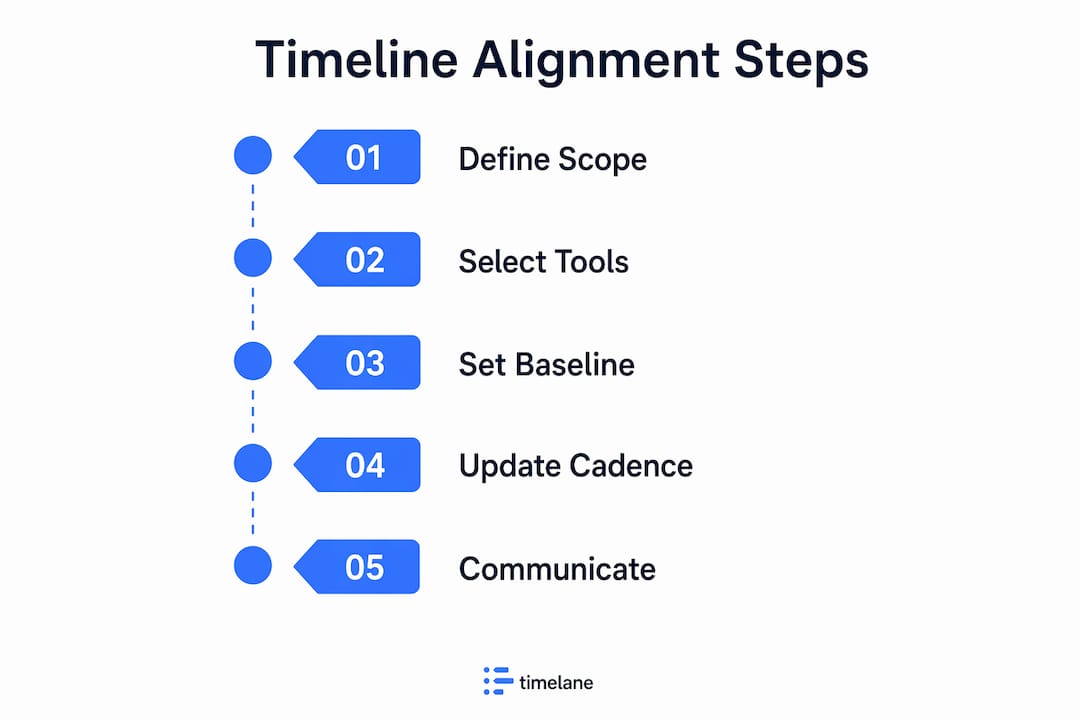
Your schedule management plan must also define update cadence and variance thresholds. Weekly updates work for most projects. Daily recalculation of the critical path is appropriate for fast-moving or high-risk work. Thresholds tell your team when a variance is small enough to self-correct and when it requires escalation.
Pro Tip: Set your variance threshold before the project starts, not after the first delay appears. A Schedule Performance Index (SPI) below 0.90 is a common trigger for escalation to the project sponsor.
How do you create and synchronize detailed project schedules?
Building a synchronized schedule across teams requires a structured sequence. Skipping steps here is the most common reason timelines fall apart in execution.
- Decompose deliverables into tasks. Use your WBS to break each deliverable into tasks small enough to assign, estimate, and track. Tasks longer than two weeks are usually too large to monitor effectively.
- Map task dependencies. Identify finish-to-start, start-to-start, and finish-to-finish relationships between tasks. Dependencies define the logical flow of work and determine which tasks can run in parallel.
- Set milestones collaboratively. Bring team leads into milestone-setting sessions. Milestones agreed upon by the people doing the work carry far more commitment than dates handed down from above.
- Assign resources with constraint awareness. Match tasks to people based on skill and availability. Flag any task where the assigned resource is already at or near full capacity on another project.
- Run resource leveling. After initial assignment, resource leveling decisions should be based on constrained resources. After leveling, calculate the resource-driven critical path to clarify whether delays come from task logic or resource limits. This distinction matters when you are deciding whether to add staff or re-sequence work.
- Lock the baseline. Once the schedule is approved, freeze it. This becomes your measurement reference for the rest of the project.
- Maintain two schedule layers. Mature schedule governance involves a frozen baseline for measurement and a working schedule for actual progress updates. Merging the two destroys your ability to measure variance meaningfully.
| Layer | Purpose | Who Updates It |
|---|---|---|
| Baseline schedule | Variance measurement and audit trail | Change control board only |
| Working schedule | Day-to-day progress tracking | Project manager and team leads |
Pro Tip: Use your project scheduling fundamentals as a reference when onboarding new team leads. A shared vocabulary around dependencies and milestones cuts alignment meetings in half.
Regular stakeholder communication is the final step in this sequence. Schedule a standing update cadence, weekly for most projects, and share variance reports against the baseline at each session. Teams that see the same numbers at the same time make faster decisions.
What are best practices for maintaining timeline alignment?
Keeping a schedule aligned over weeks or months is harder than building it. The most common failure mode is treating the project timeline as a static document rather than a live control tool. Viewing schedules as live control artifacts is a critical success factor for timeline alignment.
Concrete practices that prevent drift:
- Enter actuals on a fixed cadence. Project schedule monitoring includes entering actual start and finish dates, recalculating forecasts, analyzing variances against thresholds, and documenting corrective plans for any deviation. Do this weekly without exception.
- Never informally update the baseline. Quietly shifting baseline dates to match actuals hides slippage and removes your ability to report accurate variance. All baseline changes go through formal change control.
- Use SPI thresholds to trigger escalation. A practical threshold structure for schedule variance defines when the project manager handles a delay independently, when the sponsor must be engaged, and when a formal recovery plan is required.
- Conduct root cause analysis for every significant delay. A delay caused by a resource conflict requires a different fix than one caused by a scope change. Treating all delays the same wastes recovery time.
- Re-sequence tasks before adding resources. Adding people to a late project often slows it down further due to onboarding time. Re-sequencing tasks or reducing scope is usually faster.
“A schedule that is not actively governed is not a schedule. It is a wish list with dates attached.” This is the mindset shift that separates teams that deliver on time from those that are always catching up.
Transparent reporting is equally important. Teams that share schedule data openly, including bad news, resolve problems faster than those that filter information upward. Build a culture where a red status on a milestone is a problem to solve, not a performance failure to hide.
How do you coordinate multiple teams to ensure timeline harmony?
Cross-team coordination is where most timeline alignment efforts break down. Each team optimizes for its own deadlines, and the dependencies between teams go unmanaged until a delay in one workstream blocks three others.
Collaborative schedule planning and transparent communication across teams reduce misalignment and support on-time delivery, especially when aligning with market demands. The practical mechanics of making this happen include:
- Shared schedule visibility. Every team lead should see the full project schedule, not just their slice. When a team can see that their delay affects a downstream team’s start date, they prioritize differently.
- Cross-functional dependency reviews. Hold a weekly or biweekly meeting specifically for inter-team dependencies. This is separate from status meetings. The agenda is: what do you need from another team this week, and is it on track?
- Align the schedule with business strategy. Delivery dates tied to product launches, contract milestones, or regulatory deadlines carry more weight than internal targets. Make those external anchors visible in the schedule so every team understands the real cost of slipping.
- Prioritize critical path tasks across teams. When two teams compete for the same resource, the task on the critical path wins. This rule must be explicit and agreed upon before conflicts arise, not negotiated in the moment.
- Use a centralized planning tool. Spreadsheets shared over email cannot support real-time coordination across multiple teams. A step-by-step team scheduling approach with a centralized platform gives all teams a single source of truth for dates, assignments, and status.
Hybrid project environments add another layer of complexity. Hybrid approaches require integrating predictive baseline scheduling with agile iteration planning, demanding tailored cadence and governance for timeline alignment. If one team works in two-week sprints and another works in a traditional waterfall model, your coordination meetings and reporting cadence must account for both rhythms.
Key takeaways
Effective project timeline alignment requires a frozen baseline, a live working schedule, and a disciplined update cadence applied consistently across every team involved.
| Point | Details |
|---|---|
| Lock a schedule baseline | Freeze the approved schedule after sponsor sign-off and change it only through formal control. |
| Maintain two schedule layers | Keep the baseline separate from the working schedule to preserve meaningful variance measurement. |
| Run resource leveling early | Identify resource-driven critical paths before execution begins to prevent avoidable delays. |
| Set variance thresholds upfront | Define SPI trigger points for escalation before the first delay occurs, not after. |
| Centralize cross-team visibility | Give every team lead access to the full schedule so inter-team dependencies are managed proactively. |
What i’ve learned about timeline alignment after years in the field
Most project managers I’ve worked with treat the schedule baseline as a formality. They approve it, file it, and then quietly update it every time reality diverges from the plan. By month three, the baseline reflects current actuals rather than the original commitment, and variance reporting becomes meaningless. That habit is the single biggest cause of chronic lateness I’ve seen across agencies, SMBs, and enterprise teams alike.
The fix is not a better tool. It is a governance decision. Freeze the baseline. Accept that the working schedule will diverge. Measure that divergence honestly. The discomfort of a red SPI report is far less damaging than the false confidence of a baseline that has been quietly adjusted to look green.
Resource leveling is the other area where I see teams leave value on the table. Most teams run leveling once at the start of a project and never revisit it. But resource availability changes constantly. Running leveling again after a significant scope change or a key person going on leave often reveals a new critical path that the team did not know existed. That insight can prevent a three-week delay if you catch it early enough.
The project delivery forecasting discipline and the schedule alignment discipline are the same thing viewed from different angles. One tells you where you are going. The other tells you whether you are on the right road to get there.
— Dima
How Teambuilt helps you keep schedules aligned
Managing timeline alignment across multiple teams without a centralized platform means chasing updates through email threads and reconciling conflicting spreadsheets. Teambuilt eliminates that friction.

Teambuilt gives project managers real-time visibility into team capacity, workload distribution, and project delivery forecasts, all in one place. You can see resource conflicts before they become delays, coordinate cross-team dependencies through a shared schedule view, and track utilization against your baseline without manual data entry. For agencies and SMBs running multiple concurrent projects, Teambuilt replaces scattered workflows with a single planning layer that every team lead can access and trust. Explore Teambuilt’s project management tools to see how faster schedule coordination translates directly into more reliable delivery.
FAQ
What is project timeline alignment?
Project timeline alignment is the process of synchronizing tasks, milestones, and resources across teams so all workstreams converge on the same delivery date. It requires a locked schedule baseline, dependency mapping, and a consistent update cadence.
How often should you update a project schedule?
Most projects benefit from weekly schedule updates that include actual start and finish dates, recalculated forecasts, and variance analysis against the baseline. High-risk or fast-moving projects may require daily critical path recalculation.
What is the difference between a baseline and a working schedule?
The baseline is the frozen, approved schedule used for variance measurement. The working schedule reflects current progress and is updated regularly. Keeping them separate preserves the audit trail and makes variance reporting meaningful.
How do you handle timeline conflicts between teams?
Prioritize tasks on the critical path when two teams compete for the same resource. Establish this rule before conflicts arise. Cross-functional dependency reviews held weekly catch most inter-team conflicts before they cause delays.
What tools support project timeline synchronization?
Gantt charts, CPM analysis software, and resource leveling tools are the core methods for synchronizing project schedules. Platforms like Teambuilt add real-time cross-team coordination and centralized schedule visibility for teams managing multiple concurrent projects.
Recommended