How to Manage Team Workload Without Burning Out Your Team


TL;DR:
- Effective workload management involves continuously balancing team capacity with demand to prevent burnout and underutilization. Regular biweekly reviews, skill-aligned task assignments, and real-time visibility tools like Teambuilt help sustain productivity and team health. Fostering a culture where team members feel safe to communicate capacity issues is essential for ongoing success.
Effective workload management is defined as the deliberate process of distributing tasks across your team so that every person operates at a productive, sustainable capacity. When you know how to manage team workload well, you prevent burnout, reduce missed deadlines, and get more from the people you already have. Tools like Asana and Epicflow have made real-time workload visibility accessible to teams of every size, yet most project managers still rely on gut instinct and spreadsheets. The strategies in this article replace guesswork with a repeatable system.
What is team workload balance and why does it matter?
Team workload balance is the state in which each team member carries enough work to stay productive without crossing into overload or idle time. It sounds simple, but the gap between theory and practice is where most teams struggle.
The risks of imbalance run in both directions. Overloaded employees face burnout, declining quality, and eventually turnover. Underutilized employees disengage, lose sharpness, and represent wasted payroll. Neither extreme is acceptable if you are managing a team that needs to deliver consistently.
Workload tracking gives you the measurement layer that makes balance visible. Without it, you are managing by assumption. The utilization rate is the most direct metric to watch: according to capacity planning research, 70% utilization leaves little room to absorb new work, while pushing a team member to 95% utilization risks retention. That 25-point range is your operating window, and most managers have no idea where their people sit within it.
A balanced workload looks like this in practice:
- Each person has a clear list of active tasks with defined priorities
- No single person is the bottleneck for more than one critical project at a time
- Capacity is reviewed before new work is assigned, not after problems surface
- Time off, meetings, and non-project commitments are factored into available hours
Pro Tip: Set a team utilization target of 75% to 80% as your baseline. This leaves a buffer for urgent requests and unexpected complexity without leaving people idle.
How to forecast and plan your team’s workload using capacity planning
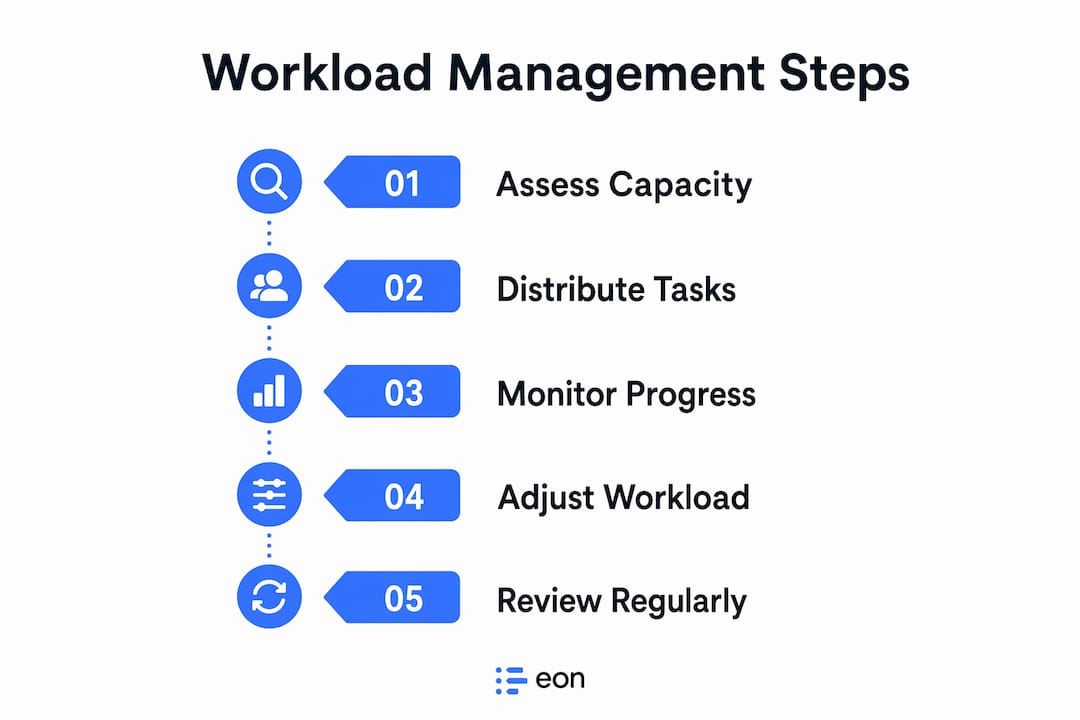
Capacity planning is the practice of comparing your team’s available hours against the work demand coming in, then adjusting assignments before conflicts occur. According to Insightful, capacity planning requires monthly to biweekly reviews to stay accurate. A quarterly review is too slow for most project-driven teams.
Here is a repeatable process you can run on a biweekly cycle:
- Collect current demand. Pull all active and upcoming projects. List every task, estimate its hours, and assign it a deadline. Do not rely on memory or verbal commitments.
- Map available capacity. Calculate each team member’s available hours after accounting for meetings, PTO, and recurring responsibilities. This is your true capacity, not the theoretical 40-hour week.
- Compare demand to capacity at the individual level. Aggregate totals hide individual overload. A team might average 78% utilization while one person sits at 110% and another at 45%.
- Redistribute before you hire. Rebalancing existing assignments often resolves overload without adding headcount. Identify tasks that can shift to underutilized team members or be deprioritized.
- Document and repeat. Record what you planned versus what actually happened. That gap is your demand history, and it makes the next cycle more accurate.
Accurate capacity planning depends on the quality of your inputs. Utilization rates, demand history, and location-based capacity must all be current and measurable. Stale data produces plans that look good on paper and fail in execution.
| Planning input | Why it matters |
|---|---|
| Actual utilization rate | Reveals true availability, not theoretical hours |
| Demand history | Improves estimate accuracy for similar future projects |
| Planned PTO and holidays | Prevents scheduling against unavailable capacity |
| Skill mapping | Matches tasks to the right people, not just available people |
Pro Tip: Run your capacity review on the same day every two weeks. Consistency turns it from a chore into a rhythm, and your estimates improve faster when you compare cycles back to back.
What frameworks and tools can help manage team workload effectively?
Prioritization frameworks and workload management tools solve two different problems. Frameworks tell you what to work on. Tools tell you who has room to do it. You need both.
The Eisenhower Matrix is the most widely applied prioritization framework for teams. It sorts tasks into four quadrants based on urgency and importance. Project prioritization frameworks like the Eisenhower Matrix help managers make faster decisions when demand exceeds capacity, which is most of the time. The matrix forces a conversation about what actually needs to happen this week versus what feels urgent but is not.
On the tool side, Asana, Epicflow, and ClickUp each offer real-time tracking and workload visualization features that integrate prioritization data with capacity information. Choosing between them depends on your team’s size, workflow complexity, and how deeply you need to track individual utilization.
| Tool | Best for | Key workload feature |
|---|---|---|
| Asana | Cross-functional teams | Workload view by person and project |
| Epicflow | Multi-project environments | AI-assisted resource balancing |
| ClickUp | Flexible, customizable workflows | Time tracking and capacity widgets |
| Trello | Small teams with simple workflows | Card-based visual task boards |
Beyond the tools themselves, the integration between your project management software and your capacity planning data is what creates real visibility. A tool that shows task lists but not hours or utilization is only solving half the problem. Look for platforms that connect team workload visualization with actual scheduling data so you can act on what you see.
For teams managing multiple concurrent projects, the ability to see cross-team dependencies and resource conflicts in one view is the feature that separates useful tools from ones that just add administrative overhead.
How to assign tasks considering skills, career goals, and workload capacity
Task assignment is where workload management becomes people management. Distributing work based purely on availability ignores two factors that directly affect output quality: skill fit and motivation.

Assigning tasks that align with individual interests and development goals produces better engagement and higher-quality work. This does not mean every task needs to be someone’s passion project. It means that when you have flexibility in who takes on a stretch assignment, you use it intentionally.
Practical strategies for smarter assignment:
- Map skills explicitly. Maintain a simple skill matrix for your team. When a new project arrives, you can match requirements to people rather than defaulting to whoever is least busy.
- Involve team members in workload conversations. People who participate in planning their own assignments are more committed to the outcomes. A 15-minute weekly check-in where each person flags their capacity is more valuable than any dashboard.
- Balance challenge with realism. Assigning growth work is good management. Assigning growth work to someone already at 90% utilization is a setup for failure. Check capacity before you stretch someone.
- Rotate high-visibility and low-visibility tasks. If the same people always get the interesting projects and the same people always get the administrative work, you will lose the second group. Rotation builds skills and signals fairness.
Pro Tip: When a team member is underperforming on a task, check whether the assignment was a skill mismatch before assuming a motivation problem. Reassigning to a better fit often resolves the issue faster than coaching.
How to monitor, adjust, and avoid common workload management mistakes
Monitoring is not a one-time check. Real-time visualization and regular feedback are what catch workload problems before they become morale problems. The goal is a system that surfaces issues early enough to act on them.
Here is a monitoring sequence that works for most project teams:
- Weekly individual check-ins. Ask each person two questions: What is your current workload level, and is anything blocking you? Keep it to 10 minutes. The data you collect is more valuable than any automated report.
- Biweekly capacity review. Compare planned versus actual utilization. Identify anyone trending above 85% for two consecutive cycles. That is your early warning signal.
- Monthly retrospective on estimates. How accurate were your hour estimates for completed tasks? Systematic underestimation is the most common root cause of chronic overload.
- Quarterly skill and goal review. Are assignments still aligned with where your team members want to grow? People’s goals shift, and your assignment logic should shift with them.
The most common mistakes managers make in workload management are predictable and avoidable. Ignoring PTO or using outdated data causes capacity planning to fail even when the process is otherwise sound. Scheduling against a full 40-hour week without accounting for meetings, administrative tasks, and interruptions guarantees overload.
Micromanagement is the other failure mode. Good workload management balances oversight with trust and autonomy. Checking in is not the same as checking up. The difference is whether your questions are about removing blockers or about surveillance.
Overloading without boundaries leads to burnout. Encouraging team members to speak up and setting clear workload limits are not soft management practices. They are retention strategies.
Key takeaways
Effective workload management requires continuous capacity planning, skill-aligned task assignment, and real-time monitoring to keep teams productive without pushing them into burnout.
| Point | Details |
|---|---|
| Target utilization range | Keep team members between 75% and 85% utilization to maintain a buffer for urgent work. |
| Biweekly capacity reviews | Compare demand to available capacity every two weeks before assigning new work. |
| Skill and goal alignment | Match tasks to individual skills and development goals, not just availability. |
| Monitor leading indicators | Track anyone trending above 85% utilization for two consecutive cycles as an early warning. |
| Avoid outdated inputs | Always account for PTO, meetings, and recurring tasks when calculating true available capacity. |
What I’ve learned about workload management that most guides skip
Most workload management advice treats the process as a scheduling problem. Get the right tasks to the right people at the right time, and everything works. After working with dozens of project teams, I can tell you the scheduling is the easy part.
The hard part is building a culture where people tell you the truth about their capacity. Most team members will say they are fine until they are not. They absorb extra work quietly, skip breaks, and work evenings before they flag an issue. By the time the problem is visible, you are already in crisis mode.
The managers I have seen do this well share one habit: they make it safe to say no. They treat “I don’t have capacity for this right now” as useful information, not a performance problem. That single cultural shift changes everything about how workload data flows upward.
I am also skeptical of any tool that promises to solve workload management without changing the underlying process. Asana and ClickUp are genuinely useful, but a team with bad estimation habits and no review cycle will produce bad data in any tool. The process has to come first. The tool amplifies whatever you are already doing, good or bad.
Capacity planning is not a quarterly exercise. It is a continuous conversation between what the business needs and what your people can actually deliver. The teams that treat it that way are the ones that scale without burning through their best people.
— Dima
See your team’s real capacity with Teambuilt

Teambuilt is built for exactly the kind of workload management this article describes. The platform gives project managers and operations leads a real-time view of team capacity, utilization rates, and project timelines in one place, replacing the spreadsheets and disconnected tools that make capacity planning so painful. You can forecast delivery dates based on actual resource availability, spot overload before it becomes a problem, and coordinate across teams without losing visibility. If you are ready to move from reactive firefighting to planned, predictable delivery, explore Teambuilt and see how it fits your team’s workflow.
FAQ
What is team workload balance?
Team workload balance is the distribution of tasks across a team so that each person operates at a productive, sustainable capacity. It means no one is chronically overloaded or consistently underutilized.
What utilization rate is healthy for a team?
A utilization rate between 75% and 85% is the target range for most project teams. Rates above 95% risk retention and burnout, while rates below 70% signal underutilization.
How often should you review team workload?
Capacity planning reviews should happen every two weeks for most project-driven teams. Monthly reviews are too infrequent to catch overload before it affects delivery.
What are the best tools for workload management?
Asana, Epicflow, ClickUp, and Trello each offer workload tracking and visualization features. The right choice depends on your team size, project complexity, and how deeply you need to track individual utilization.
How do you assign tasks without micromanaging?
Assign tasks based on a skill matrix and capacity data, then give team members ownership of execution. Balancing oversight with autonomy means checking in to remove blockers, not to monitor progress step by step.
Recommended