Step by Step Workforce Planning: A 2026 Guide



TL;DR:
- Effective workforce planning involves a continuous cycle of aligning strategy, analyzing supply, forecasting demand, and closing gaps. Success depends on clean data, cross-functional collaboration, and automation triggers that connect plans to actions. Most plans fail due to lack of ownership, outdated data, and treating planning as a one-time event rather than an ongoing process.
Workforce planning is defined as the process of forecasting an organization’s talent supply and demand, then closing the gap between the two. Done well, it puts the right people in the right roles before a vacancy becomes a crisis. Only 42% of HR teams execute it effectively, despite 92% recognizing its importance. That gap exists because most organizations treat workforce planning as an annual event rather than a continuous cycle. This guide walks through the complete step by step workforce planning process, from prerequisites to quarterly review, so your team can move from reactive to deliberate.
What are the prerequisites for step by step workforce planning?
Effective workforce planning starts before you touch a spreadsheet. You need a minimum viable dataset, the right people in the room, and tools that can turn raw data into decisions.
The data you need first
Your baseline dataset must include four categories: current headcount by role and department, skills inventory per employee, historical attrition rates by segment, and average tenure by job family. Without these four inputs, any forecast you build is speculation. Skills-based planning outperforms headcount-based approaches because job titles rarely reflect what employees can actually do. A senior developer who has spent two years in client-facing work carries transferable skills that a title alone will never surface.
38% of organizations now maintain enterprise-wide skills libraries as of 2025, up from 30% in 2023. That growth reflects a real shift: organizations are cataloging actual capabilities rather than relying on org charts. If your organization has not built a skills library yet, start with a simple self-assessment survey and validate it through manager review.
Who belongs in the room
Cross-functional collaboration among HR, Finance, IT, and business owners is not optional. Finance owns budget constraints. Business unit leaders own demand signals. IT owns data infrastructure. HR owns supply analysis. When these groups plan in silos, the output is a document nobody acts on. Executive sponsorship raises the success rate further because it forces prioritization when competing demands collide.
Tools that support the process
At minimum, you need an HRIS for headcount and attrition data, an analytics dashboard for visualization, and a skills library or competency catalog. Platforms that combine capacity and utilization tracking with real-time scheduling reduce the manual reconciliation that kills most planning cycles.
Pro Tip: Clean your data before you model it. A workforce plan built on stale HRIS records will produce confident-looking projections that are simply wrong. Audit headcount and attrition data quarterly, not annually.
What are the 7 core steps in the workforce planning process?
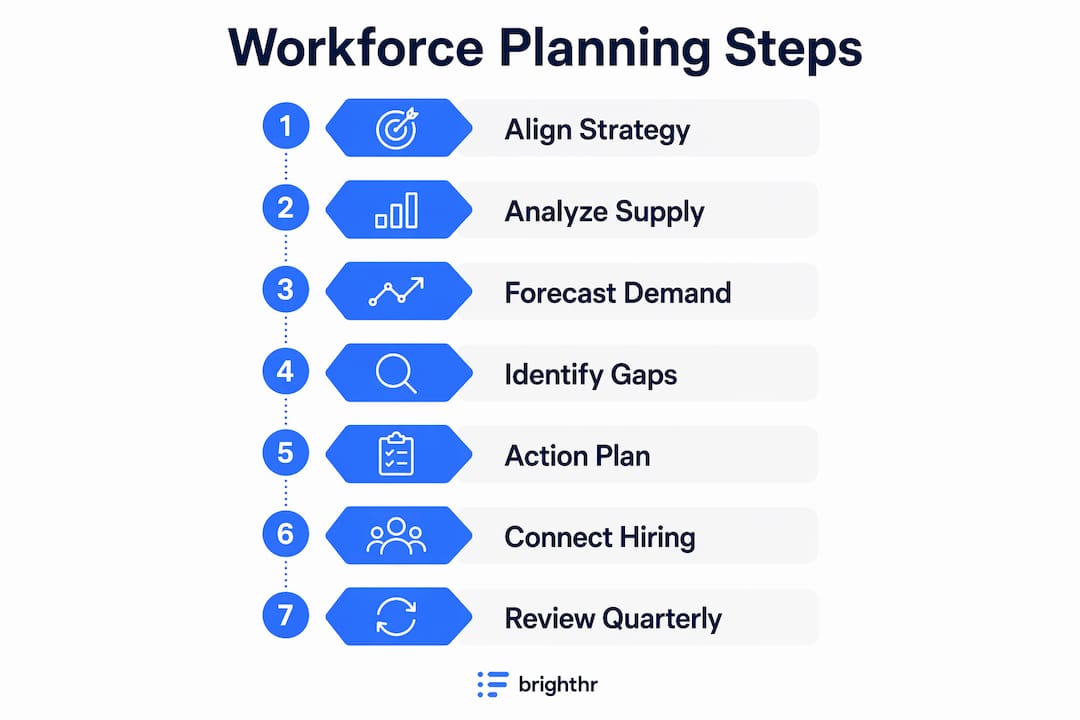
Modern workforce planning follows a 7-step continuous cycle that connects business strategy to quarterly execution. Each step builds on the last, and the cycle repeats rather than ends.
Step 1: Align with business strategy
Start by translating your organization’s strategic goals into workforce implications. A plan to expand into two new markets in 18 months requires specific roles, skills, and locations. A decision to automate a core process changes the demand picture entirely. HR leaders who skip this step produce workforce plans that finance teams ignore because they do not connect to revenue or growth targets. Use your organizational planning framework to map each strategic initiative to a talent requirement.

Step 2: Analyze current workforce supply
Supply analysis answers one question: what do you have right now? Map headcount, skills, performance distribution, and flight risk across every team. Attrition modeling uses tenure, engagement survey scores, retirement eligibility, and historical turnover rates to project how your supply will change over the next 12–18 months. That horizon gives you enough lead time to act before a gap becomes a vacancy.
Step 3: Forecast future demand
Demand forecasting translates business plans into role-level requirements. If your product roadmap requires three new engineering teams by Q3, that is a demand signal. If a regulatory change requires a compliance function that does not exist today, that is another. Effective strategic workforce planning uses a 6-year outlook with a 3-year midpoint for actionable targets. Most organizations cannot forecast six years with precision, but the discipline of thinking beyond 12 months forces decisions that short-term planning misses entirely.
Step 4: Identify gaps between supply and demand
Gap analysis compares your projected supply against your forecasted demand, role by role and skill by skill. The output is a prioritized list of shortfalls and surpluses. A shortfall in a critical role requires immediate action. A surplus in a role being phased out requires a redeployment or transition plan. Quantify every gap so you can rank them by business impact rather than urgency alone.
Step 5: Build your action plan using the five levers
Closing a gap requires choosing the right lever. The five standard levers are Build, Buy, Borrow, Bot, and Redeploy.
- Build means developing internal talent through training, mentoring, or stretch assignments.
- Buy means external hiring to fill gaps that cannot be closed internally in time.
- Borrow means using contractors, consultants, or staff augmentation for temporary or specialized needs.
- Bot means automating tasks or roles where technology can replace or reduce human effort.
- Redeploy means moving existing employees from surplus areas into shortage areas.
Most gaps require a combination of levers rather than a single solution. A critical engineering shortfall might require hiring two senior engineers while redeploying one internal candidate and automating one repetitive task.
Pro Tip: Assign a budget owner and a timeline to every lever you select. Action plans without owners become wish lists. A lever without a budget is not a plan.
Step 6: Connect planning to hiring and execution workflows
A workforce plan that does not trigger hiring workflows is paperwork. Linking forecasts to hiring execution with defined triggers prevents vacancies from catching teams off guard. One practical example: if a forecasted shortfall in a critical role exceeds 10%, a redeployment or recruiting workflow activates automatically. That threshold removes the delay between identifying a gap and acting on it.
Step 7: Review and recalibrate quarterly
The plan you build in january will be partially wrong by april. Markets shift, projects get canceled, and people leave. Quarterly recalibration prevents static plans from becoming obsolete. Each review should update supply data, reassess demand signals, and reprioritize action plans. This is the step most organizations skip, and it is the reason most workforce plans fail to deliver results.
How do you execute and integrate workforce planning with hiring?
Execution is where workforce planning either creates value or collects dust. The plan outputs must connect directly to the systems and people who act on them.
Recruiting teams need role-level demand signals with timelines, not just headcount targets. When a workforce plan specifies that three data engineers are needed by Q2 with specific skills in Python and cloud infrastructure, recruiters can source proactively rather than reactively. Treating workforce planning as a static annual exercise leads to reactive decisions and costly delays. The fix is a live dashboard that updates supply and demand data as conditions change.
Skills gap data should feed directly into your learning and development priorities. If your gap analysis shows a shortfall in project management capability across two business units, that is a training investment decision, not just a hiring decision. Redeployment workflows benefit from the same data. Building enterprise-wide skills libraries that catalog transferable capabilities makes it possible to identify internal candidates for open roles before posting externally.
Attrition modeling deserves its own execution workflow. When your model flags a team with elevated flight risk, that signal should trigger a retention conversation, not a job posting. The 12–18 month modeling horizon gives managers enough runway to intervene before the departure happens.
- Connect plan outputs to your ATS so recruiters see demand signals in real time.
- Use skills gap data to build a quarterly L&D priority list.
- Set attrition thresholds that trigger manager alerts and retention reviews.
- Schedule a monthly cross-functional check-in to catch execution drift early.
Pro Tip: Assign a single owner to the workforce plan who is accountable for both the data and the decisions. Shared ownership usually means no ownership.
What common mistakes undermine workforce planning success?
Only 11% of organizations have genuine strategic maturity in workforce planning. That number reflects how often the process breaks down at predictable points.
The most common failure is treating the plan as an annual document. Annual plans are obsolete before the ink dries. Organizations that plan workforce needs beyond 12 months represent only 12% of HR teams, which means the vast majority are operating with a planning horizon too short to act on strategically.
Poor data quality is the second most common failure. Workforce plans built on inaccurate headcount records or outdated skills data produce misleading gap analyses. Garbage in, garbage out applies here more than almost anywhere else in HR.
Ignoring skills mapping in favor of headcount targets is a third failure mode. A plan that says “hire 20 people” without specifying which skills those 20 people need creates misaligned recruiting and wasted budget.
Workforce optimization is not about cutting costs. It is about redesigning work so that people, process, and technology operate together to create sustainable productivity. The World Economic Forum frames this as a shift from isolated initiatives to continuous connected systems that generate human value.
Best practices that consistently separate high-performing organizations from the rest include maintaining a continuous planning cycle with quarterly updates, embedding cross-functional planning teams, building and maintaining a live skills library, and automating the triggers that connect plan outputs to execution workflows. Workforce optimization done right increases productivity without burning out the people delivering it.
Key Takeaways
Effective workforce planning requires a continuous 7-step cycle, clean data, cross-functional ownership, and execution triggers that connect forecasts directly to hiring and redeployment workflows.
| Point | Details |
|---|---|
| Start with clean data | Audit headcount, skills, and attrition data quarterly before building any forecast. |
| Use the 7-step cycle | Align strategy, analyze supply, forecast demand, close gaps, and review quarterly without exception. |
| Apply the five levers | Build, Buy, Borrow, Bot, and Redeploy give you options beyond hiring alone. |
| Connect plan to execution | Define quantitative triggers that activate recruiting or redeployment workflows automatically. |
| Review every quarter | Static annual plans become obsolete fast. Quarterly recalibration keeps the plan actionable. |
Why I think most workforce plans fail before they start
Most workforce plans I have seen fail at the same point: the handoff from planning to execution. The analysis is solid. The gap list is accurate. The action plan looks reasonable. Then nothing happens because nobody owns the next step.
The organizations that get this right treat the workforce plan as a living operating document, not a strategy deck. They assign a single accountable owner, set calendar-based review triggers, and build the plan into the same rhythm as financial forecasting. When workforce planning sits inside a quarterly business review rather than a separate HR process, it gets the attention and resources it needs.
The other pattern I have noticed is that leaders underinvest in skills data. Headcount is easy to count. Skills are harder to catalog, so most organizations skip it. But the organizations that build and maintain a real skills library consistently redeploy faster, hire less reactively, and waste less budget on roles that could have been filled internally.
The future of workforce planning is not more sophisticated models. It is better data discipline and tighter execution loops. AI and automation tools can accelerate both, but only if the underlying data is clean and the process is already continuous. Layering automation on top of a broken annual process just produces bad outputs faster.
The leaders who will win in 2026 and beyond are the ones who treat workforce planning as a core operational capability, not an HR deliverable. That shift in ownership changes everything.
— Dima
How Teambuilt supports your workforce planning process
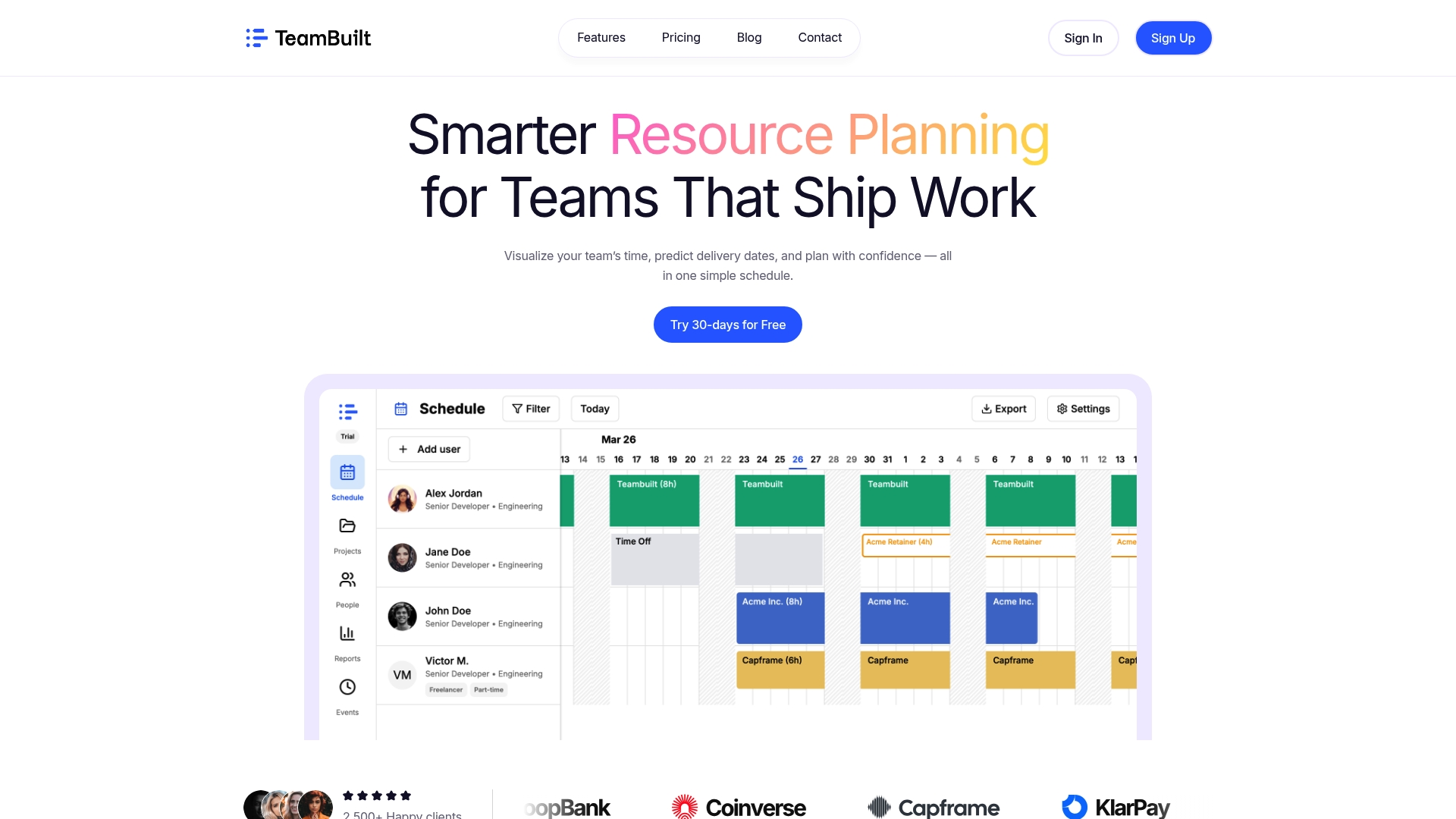
Teambuilt is built for organizations that need real-time visibility into team capacity, workload, and project timelines without rebuilding their entire tech stack. The platform combines scheduling, capacity tracking, and utilization reporting in one place, so the gap between your workforce plan and your actual team availability closes in real time rather than at the next quarterly review.
For SMBs and agencies running multiple projects across multiple teams, Teambuilt replaces the spreadsheets and disconnected tools that make execution tracking painful. You can plan and schedule your team with live data, forecast delivery dates based on real availability, and spot capacity conflicts before they become missed deadlines. If you are ready to put your workforce planning process into practice, Teambuilt gives you the operational layer to make it work.
FAQ
What is workforce planning in simple terms?
Workforce planning is the process of forecasting how many people with which skills your organization will need, then building a plan to close the gap between what you have and what you need.
How many steps are in a workforce planning process?
The industry-standard framework uses seven steps: strategy alignment, supply analysis, demand forecasting, gap identification, action planning, hiring execution, and quarterly review.
Why do most workforce plans fail?
Most plans fail because organizations treat them as annual documents rather than continuous cycles. Without quarterly recalibration and defined execution triggers, plans become outdated before anyone acts on them.
What are the five levers for closing workforce gaps?
The five levers are Build (develop internal talent), Buy (hire externally), Borrow (use contractors), Bot (automate tasks), and Redeploy (move existing employees to new roles).
How does a skills library improve workforce planning?
A skills library catalogs what employees can actually do rather than what their job title implies. That data enables faster redeployment, more accurate gap analysis, and better-targeted hiring decisions.
Recommended