Team Structure Design: A Practical Guide for Leaders


TL;DR:
- Effective team structure design aligns roles, decision authority, and communication patterns to maximize productivity and collaboration. Leaders should start from the work itself, explicitly define decision rights, and regularly review and adapt the structure as teams grow beyond 30 to 50 members. Using frameworks like Team Topologies encourages clarity, reduces cognitive load, and facilitates value delivery across dynamic organizational environments.
Team structure design is the deliberate organization of roles, reporting lines, decision authority, and communication patterns within a team to maximize collaboration and productivity. Every team has a structure, whether documented or not, and that structure shapes how decisions get made, how work flows, and how people coordinate. Frameworks like Team Topologies and tools like org charts give leaders a concrete vocabulary for making these choices intentional. When you understand what is team structure design at its core, you stop reacting to dysfunction and start building for clarity. The difference between a team that delivers and one that stalls is rarely talent. It is almost always structure.
What is team structure design and why does it matter?
Team structure design defines who reports to whom, where decision authority sits, how work divides, and how communication flows across a team. It is not just the org chart on the wall. It is the operating logic that determines whether a product manager can approve a scope change without escalating to the CEO, or whether a developer knows which team owns a shared service.
Structure affects speed. A flat team of five moves fast because everyone has context and access. A matrix team of fifty can move just as fast, but only if decision rights are explicit and communication channels are defined. Without that clarity, the matrix becomes a coordination tax that slows every decision.
The benefits of team structure extend beyond efficiency. Clear structure reduces ambiguity, which reduces anxiety. When people know their role, their authority, and who they depend on, they spend less cognitive energy on politics and more on work. That is a measurable productivity gain, not a soft benefit.
What are the common types of team structures?
Eight common types of team structures cover most organizational needs: hierarchical, functional, flat, matrix, cross-functional, divisional, team-based, and network. Each fits a different context, and choosing the wrong one for your stage or work type creates friction that no amount of culture work will fix.
Here is a direct comparison of the most widely used structures:
| Structure type | Best used when | Key advantage | Main challenge |
|---|---|---|---|
| Hierarchical | Large, stable organizations | Clear authority and accountability | Slow decision-making |
| Functional | Specialized work by department | Deep expertise per function | Siloed communication |
| Flat | Early-stage startups | Speed and direct access | Breaks down past ~30 people |
| Matrix | Projects spanning multiple functions | Flexible resource use | Dual reporting creates confusion |
| Cross-functional | Product or project delivery | End-to-end ownership | Requires strong facilitation |
| Divisional | Multi-product or multi-region orgs | Autonomy per business unit | Duplicated resources |
| Network | Distributed or partner-heavy work | Agility and specialization | Coordination complexity |
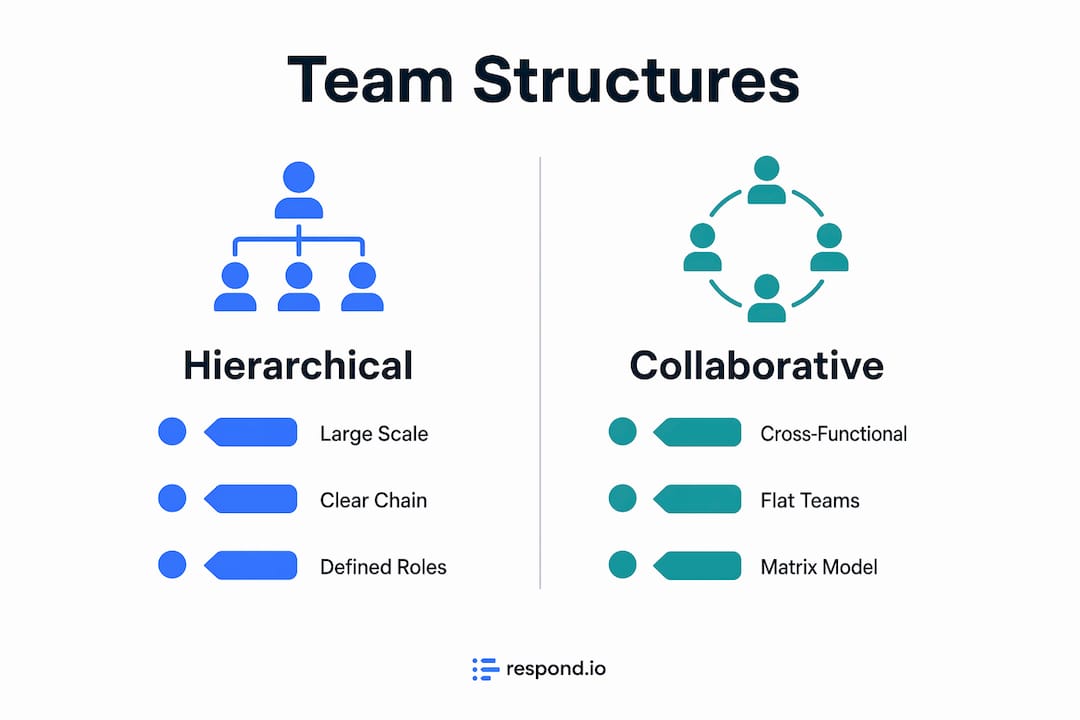
Most small businesses start flat with everyone reporting to the founder, then transition to functional structures as headcount grows. That transition point, usually around 15 to 30 people, is where structure design decisions become critical. Getting them wrong at that stage creates bottlenecks that compound for years.
Cross-functional and team-based structures have gained traction in product and technology organizations because they align ownership with outcomes. When one team owns a user journey from design through deployment, accountability is clear and handoffs shrink.
What core principles guide effective team structure design?
The most important principle in effective team design is this: start from the work, not the org chart. Effective team design begins with understanding the team’s task type and adapts size, diversity, and composition accordingly. Problem-solving tasks require diverse skills and perspectives. Operational tasks need clear roles and smaller, focused teams.
Four principles apply across every structure type:
- Match composition to task. A team solving novel problems needs cognitive diversity. A team running repeatable processes needs role clarity and minimal handoffs.
- Define decision authority explicitly. Every team lead should know which decisions they own outright, which require consultation, and which require escalation. Ambiguity here is the single biggest source of structural friction.
- Set communication patterns by design. Who talks to whom, how often, and through which channel should be a deliberate choice, not an emergent habit.
- Size for the work. Smaller teams move faster and communicate more naturally. Larger teams need formal coordination mechanisms to compensate.
Pro Tip: Document decision rights in a simple one-page matrix when you formalize a team structure. List the five to ten most common decision types and mark who owns each one. This single document eliminates most escalation loops.
Leaders should design teams starting from the actual work and expected collaboration patterns, not the org chart they prefer. This sounds obvious, but most leaders do the opposite. They draw the structure they are comfortable with, then try to fit the work into it.

Scaling beyond 30 to 50 members requires clear decision domains and explicit accountability to avoid blurred ownership. Flat structures that worked at ten people create overload and inefficiency at fifty. Formalized team design is not bureaucracy at that point. It is infrastructure.
How do Team Topologies and Agile at scale shape modern team design?
Team Topologies, developed by Matthew Skelton and Manuel Pais, gives leaders a precise vocabulary for how to design teams around value delivery rather than functional reporting. Four fundamental team types optimize flow and reduce cognitive load: stream-aligned, enabling, complicated subsystem, and platform teams.
- Stream-aligned teams own a continuous flow of work aligned to a business domain or user journey. They are the primary delivery unit.
- Enabling teams work temporarily with stream-aligned teams to build capability, then step back. They are coaches, not permanent dependencies.
- Complicated subsystem teams own areas requiring deep specialist knowledge, such as a payments engine or a machine learning pipeline, so stream-aligned teams do not need to carry that complexity.
- Platform teams provide self-service capabilities that reduce the cognitive load on stream-aligned teams. Think internal developer platforms or shared data infrastructure.
“Restricting team topologies to these four types promotes efficient collaboration and reduces cognitive load across the organization.” — SAFe Framework on Team Topologies at Scale
The Scaled Agile Framework (SAFe) extends this thinking through Agile Release Trains (ARTs), which organize multiple teams around a shared value stream. The principle is the same: structure follows value flow, not functional hierarchy.
Telenet, the Belgian telecom, restructured its technology organization around Team Topologies principles and reported faster delivery cycles and clearer ownership across previously tangled team boundaries. The lesson is not that every organization should copy Telenet’s model. It is that the four-type framework forces leaders to ask the right question: what cognitive load are we placing on each team, and is the structure reducing or amplifying it?
For leaders managing dynamic team environments, the Team Topologies model works best as a lens rather than a rigid prescription. Use it to audit your current structure and identify where teams are carrying work that belongs elsewhere.
What practical steps can leaders take to design or evolve a team structure?
Designing or adjusting a team organization framework does not require a full reorganization. Most structural improvements come from small, deliberate changes applied consistently. Here is a practical sequence:
- Inventory current roles. List every role on the team and what each person actually does day to day, not just their job title. Gaps and overlaps become visible immediately.
- Identify natural team groupings. Look for clusters of people who collaborate daily and own related outcomes. These are your natural team units.
- Define reporting lines. Clarify who each person reports to for performance, priorities, and day-to-day decisions. Dual reporting is fine in a matrix, but it must be explicit.
- Document decision authority. For each team lead, specify which decisions they own, which require input, and which escalate upward. Explicit decision rights reduce the vast majority of structural friction within teams.
- Communicate the structure. Share org charts and decision rights documentation with the full team. Use them during onboarding so new members understand the operating model from day one.
- Schedule quarterly reviews. Team structures should evolve over time, with small, frequent adjustments preferred over large disruptive reorganizations. A quarterly check-in to review what is working and what is not keeps the structure current without creating change fatigue.
Pro Tip: Use your org chart as an onboarding tool, not just an HR artifact. Walk every new hire through the decision rights document in their first week. It cuts the time to productivity faster than any other onboarding practice.
Common traps to avoid include founder bottlenecks, where every significant decision routes through one person, and ambiguous authority, where two team leads both believe they own the same decision. Both are structural problems, not personality problems. Fix the structure and the behavior changes. For teams applying Agile workflow principles, this step-by-step approach maps directly onto sprint retrospectives and team health checks.
How can leaders keep collaboration flowing within their chosen structure?
Collaboration is not a default state to maximize. It is a specific interaction mode with a cost. Three primary interaction modes govern how teams work together: Collaboration (temporary, high-bandwidth problem-solving), X-as-a-Service (one team provides a defined service to another), and Facilitating (one team helps another build capability).
The most common mistake leaders make is treating collaboration as the answer to every coordination problem. Prolonged collaboration without clear intent causes delivery delays and organizational friction. When two teams have been “collaborating” for six months with no end date, that is not collaboration. It is a sign of unclear ownership.
Practical guidance for managing interaction modes:
- Set a time boundary on every collaboration engagement. Define what the teams are solving together and when the interaction should shift to a service or facilitation model.
- Use X-as-a-Service for stable, repeatable dependencies. If Team A always needs something from Team B, formalize it as a service with a defined interface rather than ongoing negotiation.
- Apply Facilitating mode when a team needs to build a new capability. The enabling team transfers knowledge and then exits. Persistent facilitation is a dependency in disguise.
- Monitor cognitive load as a structural signal. When a team consistently misses deadlines or reports confusion about priorities, the structure is creating overload, not the people.
Adaptive team boundaries and feedback loops help maintain effective team functioning as demands change. Build a regular rhythm of asking teams how their interactions are working, and treat the answers as structural data.
Key takeaways
Team structure design is the single highest-leverage decision a leader makes because it determines how every other decision, communication, and collaboration will function.
| Point | Details |
|---|---|
| Start from the work | Design team composition and size based on task type, not preferred org charts. |
| Define decision authority | Document who owns which decisions to eliminate escalation loops and structural friction. |
| Use interaction modes deliberately | Collaboration, X-as-a-Service, and Facilitating each serve different purposes. Match the mode to the need. |
| Evolve structure regularly | Small, frequent adjustments outperform large reorganizations for maintaining team effectiveness. |
| Scale requires formalization | Flat structures break down past 30 to 50 people. Explicit accountability prevents blurred ownership at scale. |
Why most leaders get team structure wrong
The most common mistake I see is leaders treating team structure as a one-time decision. They draw an org chart during a planning offsite, share it in a slide deck, and consider the job done. Six months later, the structure on paper bears no resemblance to how work actually flows.
Structure is not a document. It is a living operating model. The leaders who get it right treat their team organization framework the way engineers treat code: something to be reviewed, refactored, and improved on a regular cadence. They hold quarterly structure reviews the same way they hold quarterly business reviews.
The second mistake is confusing activity with clarity. I have watched teams add more meetings, more Slack channels, and more project management tools to solve problems that are fundamentally structural. If two teams do not know who owns a decision, a new tool will not fix that. Only explicit decision rights documentation will.
Frameworks like Team Topologies are genuinely useful, but only as lenses. The four team types give you a vocabulary for diagnosing structural problems. They are not a template to copy. Every organization has a unique combination of work types, talent, and constraints. The best team structure is the one that fits your actual work, not the one that looks cleanest on a slide.
Solicit feedback from your teams directly and treat it as structural data. The people doing the work know exactly where the friction is. Your job as a leader is to listen and then change the structure, not the people.
— Dima
Put your team structure into practice with Teambuilt

Designing a team structure is one thing. Keeping it visible, current, and connected to actual workloads is another. Teambuilt gives organizational leaders and project managers a centralized platform to visualize team capacity, track utilization, and coordinate across multiple teams in real time. You can see who is overloaded, where delivery dates are at risk, and how your team structure is performing against actual project demand. No spreadsheets, no scattered workflows. If you are ready to move from a static org chart to a live operating model, explore Teambuilt and see how it fits your team’s structure today.
FAQ
What is team structure design?
Team structure design is the deliberate arrangement of roles, reporting lines, decision authority, and communication patterns within a team. It determines how work divides, how decisions get made, and how people coordinate to deliver outcomes.
What are the main types of team structures?
The eight most common types are hierarchical, functional, flat, matrix, cross-functional, divisional, team-based, and network. Each fits a different organizational context, and the right choice depends on team size, work type, and the level of coordination required.
How does Team Topologies improve team structure design?
Team Topologies defines four team types (stream-aligned, enabling, complicated subsystem, and platform) and three interaction modes that reduce cognitive load and clarify ownership. It gives leaders a structured vocabulary for diagnosing and improving how teams collaborate and deliver value.
When should a team structure change?
Team structures should evolve through small, frequent adjustments rather than large reorganizations. A quarterly review of reporting lines, decision authority, and interaction patterns is enough to keep the structure aligned with changing work demands.
How do you avoid bottlenecks in a team structure?
Document decision rights explicitly for every team lead, specifying which decisions they own outright versus which require escalation. Explicit decision authority eliminates most escalation loops and prevents the founder or manager bottleneck that stalls growing teams.
Recommended