Utilization Tracking Workflow: A Guide for Project Managers



TL;DR:
- Effective utilization tracking captures real-time data on time, resources, and tasks to improve profitability. Connecting systems like time trackers, project management, and finance tools ensures accurate insights for proactive resource management. AI-driven workflows enable continuous monitoring, early risk detection, and better decision-making to optimize team performance.
A utilization tracking workflow is the active process of capturing, monitoring, and analyzing how your team’s time is allocated across projects, clients, and tasks to prevent waste and protect margins. Most project managers know they have a resource problem. Few have a system that catches it before it costs them. Organizations with effective utilization tracking can increase profitability by up to 30%, which means the gap between a reactive spreadsheet review and a real-time workflow is often the gap between a profitable quarter and a missed target. Tools like Harvest, Asana, and NetSuite are already embedded in how modern teams work. The question is whether your workflow connects them into something that actually tells you what is happening right now.
What does a utilization tracking workflow require?
Before you build the workflow, you need the right inputs. A utilization tracking workflow depends on three categories of data: time entries, resource availability, and task assignments. Without all three, your numbers will be incomplete and your decisions will follow.
Software categories you need in place:
- Time tracking tools such as Harvest or Toggl Track for capturing billable and non-billable hours
- Project management platforms such as Asana, Jira, or Monday.com for task and milestone data
- ERP or PSA systems such as NetSuite or Kantata for financial and billing integration
- HCM platforms such as Workday or BambooHR for headcount and availability data
Accurate utilization tracking requires integrated systems that link time entry, resource planning, and billing. Disconnected tools produce disconnected data. If your time tracker does not talk to your project management platform, you are reconciling manually every week and losing accuracy in the process.
The standard measurement formula is the foundation of every workflow. The utilization rate formula is (Total Billable Hours / Total Available Hours) × 100. That formula only works if you are capturing both sides of the equation in real time.

| Data Input | Source System | Why It Matters |
|---|---|---|
| Billable hours logged | Harvest, Toggl Track | Measures revenue-generating activity |
| Non-billable productive hours | Asana, Jira | Prevents skewed capacity view |
| Available hours per person | HCM or scheduling tool | Sets the denominator accurately |
| Task assignments and deadlines | Project management platform | Flags future overloads before they happen |
| Financial KPIs per project | ERP or PSA system | Connects utilization to margin |
Pro Tip: Track non-billable productive hours separately from idle time. Training, internal meetings, and proposal work all consume capacity. Lumping them together with true downtime will make your team look underutilized when they are not.
Integrated tools like Harvest combined with Asana and Trello improve time tracking and task alignment for utilization accuracy. The goal is a single source of truth, not a patchwork of exports.
How do you build a step-by-step utilization tracking workflow?
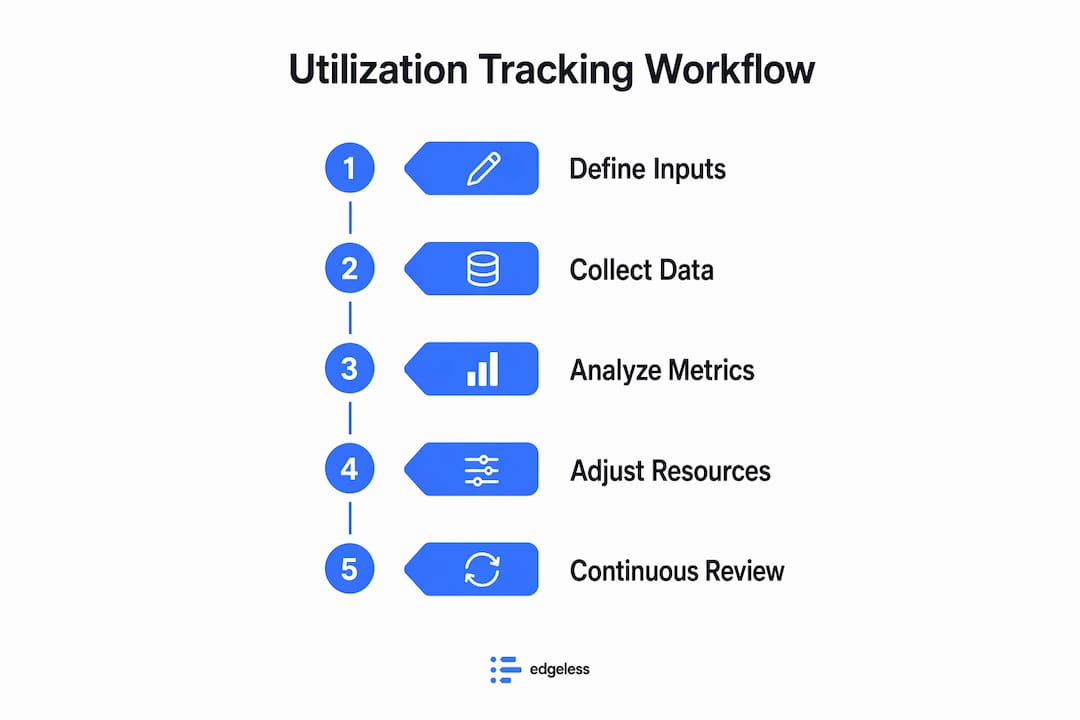
A well-designed resource utilization process moves from data capture to decision in a defined sequence. Here is a practical workflow you can adapt for your team size and industry.
- Define your tracking scope. Decide which roles, projects, and time categories you will monitor. Set target utilization benchmarks per role. A senior consultant and a junior analyst should not share the same benchmark.
- Set up automated time capture. Configure your time tracking tool to log hours at the task level, not just the project level. Harvest and Toggl Track both support timer-based and manual entry with project and task tagging.
- Connect your project management data. Link task completions and milestone updates in Asana or Jira to your utilization dashboard. Each milestone completion is a signal point that should trigger a forecast update.
- Build your operational control layer. This is the live view: a dashboard that shows current utilization by person, team, and project. This is distinct from your retrospective reports. Traditional utilization management is retrospective and slow, while AI-driven systems provide near-real-time operational control. Your operational layer needs to surface problems today, not next Friday.
- Define routing rules for exceptions. When someone drops below 60% utilization for three consecutive days, the workflow should route an alert to their manager. When someone exceeds 90% for a week, the same applies. These thresholds are yours to set, but they must exist.
- Schedule retrospective reviews. Weekly or bi-weekly reviews compare actual utilization against targets. These sessions inform hiring decisions, project staffing, and pricing adjustments.
- Iterate based on findings. Adjust benchmarks, routing rules, and data inputs quarterly. A workflow that does not evolve will drift out of alignment with how your team actually works.
| Workflow Layer | Purpose | Frequency |
|---|---|---|
| Operational control | Catch problems in real time | Continuous or daily |
| Retrospective reporting | Analyze trends and adjust strategy | Weekly or bi-weekly |
| Forecast updates | Predict future capacity gaps | Per milestone or sprint |
| Exception routing | Alert managers to outliers | Triggered by threshold |
Pro Tip: Start with one team as a pilot before rolling out company-wide. A four-week pilot with a single project team will surface data quality issues, resistance points, and missing integrations before they become organization-wide problems.
For agencies managing multiple clients simultaneously, a scalable agency workflow approach helps you apply these steps across accounts without rebuilding the process each time.
What are the most common mistakes in utilization tracking?
The most damaging mistakes in a resource utilization process are not technical. They are behavioral and structural. Here is what consistently breaks otherwise well-designed workflows.
Inconsistent time entry is the top offender. When team members log hours in batches at the end of the week, the data reflects memory, not reality. Daily logging, even a five-minute end-of-day habit, produces far more accurate data.
Siloed systems create blind spots. If your billing team uses NetSuite and your project team uses Asana with no integration, you will never see the full picture. Integrating ERP, PSA, HCM, and CRM systems provides a comprehensive view for utilization tracking and margin management.
Ignoring non-billable productive time skews your capacity model. Utilization tracking must include both billable and productive non-billable hours to avoid a distorted view of team capacity. A developer spending 20% of their week on internal tooling is not underutilized. They are just not billable.
Misreading the numbers is a subtler problem. Utilization data alone can mislead. A consultant at 95% utilization on a fixed-fee project that is running over scope is not a success story. Pair utilization metrics with project margin data to understand what the numbers actually mean.
“Utilization measures time allocation, not output or quality. Context is critical for interpretation.” — NetSuite
Retrospective-only tracking leaves you reacting instead of managing. By the time your weekly report shows a problem, the financial impact has already started. Workload management software helps set utilization benchmarks and balance workloads to prevent burnout before it registers in your attrition numbers.
For a deeper look at how workload tracking connects to utilization decisions, the distinction between capacity and workload is worth understanding clearly.
How does AI improve utilization tracking and resource optimization?
AI-driven workflows change the fundamental nature of utilization management. The shift is from weekly reviews to continuous monitoring. AI workflows enable continuous monitoring and early detection of utilization risks before they produce financial impact. That is not a marginal improvement. It is a structural change in how project managers act on data.
Here is what an AI-enhanced workflow actually does differently:
| Capability | Traditional Workflow | AI-Driven Workflow |
|---|---|---|
| Monitoring frequency | Weekly or bi-weekly | Continuous |
| Risk detection | After the fact | Before financial impact |
| Data sources | Time tracker and PM tool | ERP, PSA, HCM, CRM combined |
| Manager action trigger | Manual review | Automated alert with recommended action |
| Staffing decisions | Based on gut and history | Based on predictive modeling |
AI analytics platforms convert operational data into action paths, recommending staffing changes or billing adjustments before financial impact occurs. A practical example: if a project’s logged hours are trending 15% above estimate at the halfway point, an AI workflow flags this to the project manager and account lead simultaneously, with a recommended scope conversation or resource reallocation. No manual report required.
Human oversight remains critical. AI surfaces the signal. The project manager provides the strategic account context and makes the call. The workflow automates the detection and routing. The judgment stays with your team.
Pro Tip: When evaluating AI-powered tools, ask specifically whether they integrate with your existing ERP and PSA systems. A standalone AI tool that cannot read your billing data will only solve half the problem.
For project managers exploring workflow automation examples that go beyond basic time tracking, AI-driven utilization monitoring is one of the highest-leverage places to start.
Key takeaways
A well-built utilization tracking workflow connects real-time data capture, integrated systems, and defined routing rules to give project managers control over resource allocation before problems become costs.
| Point | Details |
|---|---|
| Define your data inputs first | Capture billable hours, non-billable time, and availability before building any dashboard. |
| Integrate your systems | Link your time tracker, project management tool, and ERP to eliminate manual reconciliation. |
| Build an operational control layer | Use live dashboards with exception alerts, not just weekly retrospective reports. |
| Pair utilization with financial KPIs | Utilization rate alone does not tell you whether a project is profitable. |
| Use AI for continuous monitoring | AI-driven workflows detect staffing and margin risks before they show up in financial results. |
What i’ve learned from building these workflows in practice
The most common mistake I see project managers make is treating utilization tracking as a reporting exercise rather than an operational one. They build a beautiful dashboard, share it in the Friday standup, and then wonder why nothing changes. The dashboard is not the workflow. The workflow is what happens when the dashboard shows a problem.
The teams that get the most value from tracking start small. One team, one project type, four weeks. That pilot surfaces every data quality issue, every integration gap, and every person who is logging time inconsistently. Fix those problems at small scale before you roll out to 50 people.
I have also seen the well-being argument used to resist tracking entirely. The concern is real: nobody wants to feel surveilled. But the teams I have worked with that have no utilization visibility are the ones where burnout actually happens. When a manager cannot see that someone is at 110% capacity, they keep assigning work. Visibility protects people. The key is communicating that clearly before you launch the workflow.
The trend toward AI-driven continuous monitoring is real and accelerating. But the organizations getting value from it are the ones that already had clean data and integrated systems. AI does not fix a broken data foundation. It amplifies whatever you feed it. Get the basics right first, then layer in the intelligence.
For teams thinking about resource planning optimization, the utilization workflow is the foundation everything else is built on.
— Dima
See how Teambuilt handles utilization tracking
If you are ready to move beyond spreadsheets and disconnected tools, Teambuilt gives project managers and team leads a centralized platform for real-time capacity tracking, workload visualization, and resource planning across multiple teams.

Teambuilt connects scheduling, utilization data, and project timelines in one place, so you can see who is overloaded, who has capacity, and where your next delivery risk is coming from. The platform integrates with your existing tools via open API and pre-built connectors, which means you are not rebuilding your stack. You are connecting it. Explore Teambuilt to see how it fits your team’s workflow, or request a demo to walk through the resource planning features hands-on.
FAQ
What is a utilization tracking workflow?
A utilization tracking workflow is the structured process of capturing, monitoring, and analyzing how team members allocate their time across projects and tasks. It connects time tracking, project management, and financial data to give managers a real-time view of resource use.
What is the standard formula for utilization rate?
The utilization rate formula is (Total Billable Hours / Total Available Hours) × 100. For a complete picture, productive non-billable hours should be tracked separately alongside billable time.
Why is real-time tracking better than weekly reports?
Weekly reports show what already happened. Real-time tracking lets managers act before a staffing conflict or margin problem compounds. AI-driven systems provide continuous monitoring that traditional retrospective reviews cannot match.
What tools do i need to start tracking utilization?
You need a time tracking tool such as Harvest or Toggl Track, a project management platform such as Asana or Jira, and ideally an ERP or PSA system such as NetSuite for financial integration. All three should be connected, not operated in isolation.
How do i avoid misleading utilization data?
Pair utilization metrics with financial KPIs like project margin and revenue per team member. A high utilization rate on an unprofitable project is not a good outcome. Context from your ERP and billing systems is what turns a number into a decision.
Recommended