
What Is Workload Tracking? A Guide for Project Managers



TL;DR:
- Workload tracking provides real-time visibility into team capacity, not just hours logged, to prevent burnout and missed deadlines. It differs from time tracking by focusing on future workload balance, requiring managerial authority and culture that promotes transparency. Implementing automated data collection and continuous monitoring enhances resource allocation, project predictability, and overall team health.
Most project managers assume workload tracking is just a fancier version of time tracking. That assumption costs teams deadlines, morale, and their best people. Workload tracking is specifically about visibility: who is doing what, how much capacity they have left, and whether the distribution of work across your team is actually sustainable. It sits at the intersection of resource planning and team health. This article breaks down what workload tracking really means, how it differs from related concepts, and how you can apply it practically to run better projects.
Table of Contents
- Key takeaways
- What workload tracking actually means
- Why workload tracking matters for your team
- Modern tools and techniques for tracking workload
- How to implement workload tracking in your team
- Benefits and mistakes to avoid
- My honest take on what most teams get wrong
- See it in action with Teambuilt
- FAQ
Key takeaways
| Point | Details |
|---|---|
| Workload tracking is not time tracking | It monitors who does what and how much capacity remains, not just hours logged. |
| Visualization turns data into decisions | Converting raw capacity data into dashboards enables faster, more accurate rebalancing. |
| Ad hoc work distorts accuracy | Unrecorded Slack requests and quick favors consume real time and must be captured. |
| Managers need authority, not just data | Tracking is only useful when someone has the power to reassign and rebalance work. |
| Culture matters as much as tools | Transparency and regular communication prevent the blind spots that no software can fix. |
What workload tracking actually means
Workload tracking is the practice of continuously monitoring how work is distributed across your team. It answers three questions: who is doing what right now, how much capacity each person has remaining, and whether that distribution is balanced enough to meet your delivery commitments. Effective workload tracking requires visibility into assignments, data on capacity, and managerial authority to act on what you find.
That definition immediately separates workload tracking from simple time tracking. Time tracking records hours spent after the fact. Workload tracking is forward-looking. It tells you whether someone is about to hit their ceiling before they do, not after the deadline slips.
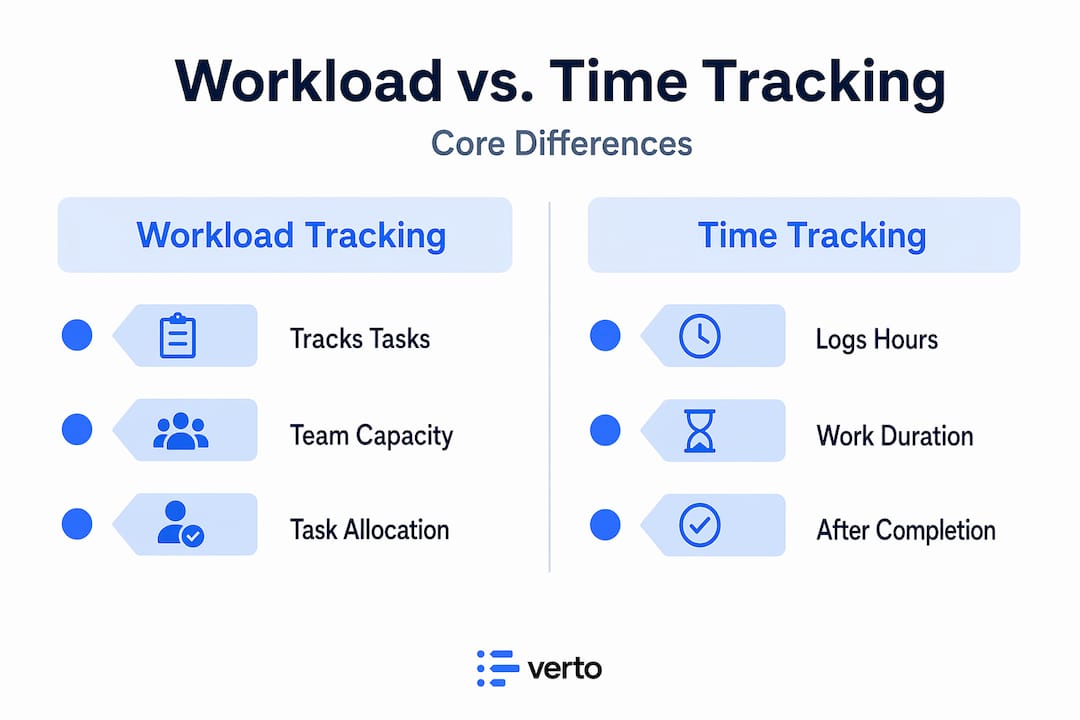
It also differs from workload management and workload visualization, two concepts that are often used interchangeably with tracking but are not the same thing.
| Concept | What it does | When you use it |
|---|---|---|
| Workload tracking | Monitors task assignments and remaining capacity in real time | Ongoing, daily operational oversight |
| Workload management | The decision-making process of redistributing and prioritizing work | When imbalances are identified and need correction |
| Workload visualization | Converts tracking data into charts, heatmaps, and dashboards | When communicating capacity status to stakeholders |
Tracking is the foundation. Management is the action. Visualization is the communication layer on top.
One often-missed dimension of workload tracking is capturing what is project workload in its full scope. Most platforms record planned tasks well, but untracked ad hoc requests such as Slack messages and quick favors consume significant time and never appear in the system. That gap means your capacity data is wrong before you even start analyzing it.
Why workload tracking matters for your team
The most immediate benefit is bottleneck detection. When you can see workload distribution across your team in real time, you spot the points where work is piling up before those points become missed deadlines or SLA breaches. Workload tracking provides visibility into team capacity that makes this early warning possible.
The second benefit is protecting your best people. High performers tend to attract more work. Managers who rely on intuition rather than data keep assigning to whoever appears capable, which means the same three people are always overloaded while others have margin. Top performers receiving disproportionate work eventually burn out, and when they leave, institutional knowledge walks out with them.

There is also a quality argument. When people are overloaded, they cut corners. Work quality drops, errors increase, and you spend more time fixing mistakes than moving forward. Sustainable workloads produce better outputs consistently.
Pro Tip: Track both planned tasks and time-sensitive interruptions in the same system. If your team is spending 20% of their week on unrecorded ad hoc requests, your capacity numbers are off by 20%, and every resource decision you make is based on flawed data.
The importance of tracking workload also extends to planning. When you have historical capacity data, your delivery forecasts become grounded in reality rather than optimism. You can tell a client with confidence when a project will ship, because you know exactly what your team is carrying.
Modern tools and techniques for tracking workload
The days of maintaining workload in a spreadsheet are behind us, or at least they should be. Modern workload tracking relies on a combination of automated data collection, integrated dashboards, and continuous monitoring rather than periodic check-ins.
Here are the primary technological approaches teams use today:
- Real-time task management platforms that sync assignments automatically, so capacity data updates the moment a task is added, completed, or reassigned.
- Automated telemetry and system logs in operational environments that reduce manual entry. In healthcare and manufacturing, for example, RFID-based tracking has dramatically cut the time spent on manual administrative reconciliation.
- Role-specific visual dashboards that translate raw assignment data into heatmaps, queue-depth monitors, and capacity indicators. Managers rely on live SLA heatmaps integrated directly into their workflows rather than pulling static reports.
- Integrated time tracking that connects actual hours worked to planned capacity, giving you the comparison you need without requiring separate tools.
- Workload forecasting that projects future capacity based on current assignments and incoming pipeline, so you can plan hiring or reassignments before the crunch hits.
Pro Tip: Avoid tracking workload only during planning meetings. Snapshots taken once a week miss the fluctuations that happen between meetings. Continuous tracking reveals trends that point reviews never will.
The question of why use workload visualization becomes obvious once you see it in practice. Role-aware dashboards reduce cycle time by enabling fast rebalancing across queues. Instead of a manager spending 30 minutes analyzing a spreadsheet to figure out who has capacity, a single view answers the question in seconds. The benefits of workload visualization compound over time because faster decisions mean fewer delays cascading through your project timeline.
Modern tracking also shifts focus from point-in-time cost to efficiency over time. Tracking trends like cost per unit delivered reveals inefficiencies that a single snapshot would never surface, particularly in DevOps and engineering-heavy teams managing cloud infrastructure alongside delivery work.
How to implement workload tracking in your team
Getting workload tracking right does not require a large technology investment. It requires process discipline and the right mindset from your team leads first.
- Capture everything in one system. Planned tasks, recurring work, and ad hoc requests all need to live in the same place. If your team handles requests outside the system, build a lightweight intake process so those tasks get recorded. Partial data produces partial insight.
- Run short, structured standups focused on capacity. 15-minute standups where team members share their capacity level using a simple red, yellow, or green signal surface blockers quickly and give managers the data they need to rebalance without long meetings.
- Give managers the authority to act. Data without authority is frustrating. Managers must have the ability to reassign work, adjust priorities, and push back on incoming requests when the team is at capacity. Tracking without that authority produces awareness without change.
- Pair quantitative data with qualitative check-ins. Capacity numbers tell you what. Conversations tell you why. A team member showing yellow in the dashboard might be dealing with a personal issue, a skill gap, or a process inefficiency. Regular one-on-ones validate what the data suggests.
- Integrate without surveilling. Use workload tracking software to understand distribution and plan better, not to monitor individuals minute by minute. Teams that feel watched rather than supported stop logging honestly, which destroys your data quality entirely.
For a practical framework on scaling these practices as your team grows, the guide on optimizing team capacity covers common pitfalls that emerge specifically in growing organizations.
Benefits and mistakes to avoid
Understanding the benefits of workload tracking is one thing. Knowing what derails a good system is equally valuable.
Primary benefits:
- Improved resource allocation, with work distributed based on actual capacity rather than assumption
- Reduced burnout by catching overloaded team members before they hit their breaking point
- Higher delivery predictability because your forecasts reflect real availability
- Better project quality resulting from sustainable, balanced workloads
- Stronger team efficiency gains from eliminating the idle time that comes from poor distribution
Most common mistakes:
- Ignoring untracked work. If ad hoc tasks are not in your system, your capacity data has a gap that grows larger the more interrupt-driven your team is.
- Relying only on snapshots. Weekly or monthly reviews miss the week-to-week shifts that cause the real damage. Continuous tracking reveals patterns; periodic reviews only show consequences.
- Skipping the communication layer. Numbers tell you there is a problem. Only conversation tells you what the problem actually is. Cutting standups or one-on-ones in favor of dashboards alone is a mistake.
- Treating tracking as surveillance. When team members feel monitored rather than supported, they game the system or stop logging honestly. The data becomes unreliable and the tool loses its value.
My honest take on what most teams get wrong
I’ve worked with enough project managers to spot the pattern quickly. The teams that struggle most with workload tracking are not struggling because they lack tools. They struggle because they track the wrong things or they track accurately but nobody has the authority to act on what they find.
In my experience, the most common failure is invisible workload. Everyone on the team is technically within their assigned task capacity, but nobody is accounting for the Slack messages, the “quick questions,” and the unplanned review requests that fill the gaps. When you add those up, some people are carrying 30% more than what appears in any system. That is the gap that causes the quiet burnout nobody sees coming.
What I’ve found is that successful managers do two things differently. They build a culture where people feel safe signaling that they are at capacity, and they treat that signal as data rather than weakness. A team member saying “I’m at red” in a standup should trigger a calm rebalancing conversation, not a performance concern.
The other thing I’ve learned: tracking improves delivery predictability faster than almost any other operational change. When you genuinely know what your team is carrying, your estimates stop being guesses. That single shift changes how clients, stakeholders, and leadership perceive your team’s credibility.
— Dima
See it in action with Teambuilt
If the concepts in this article resonate, Teambuilt was built to put them into practice without the complexity of stitching together multiple tools.
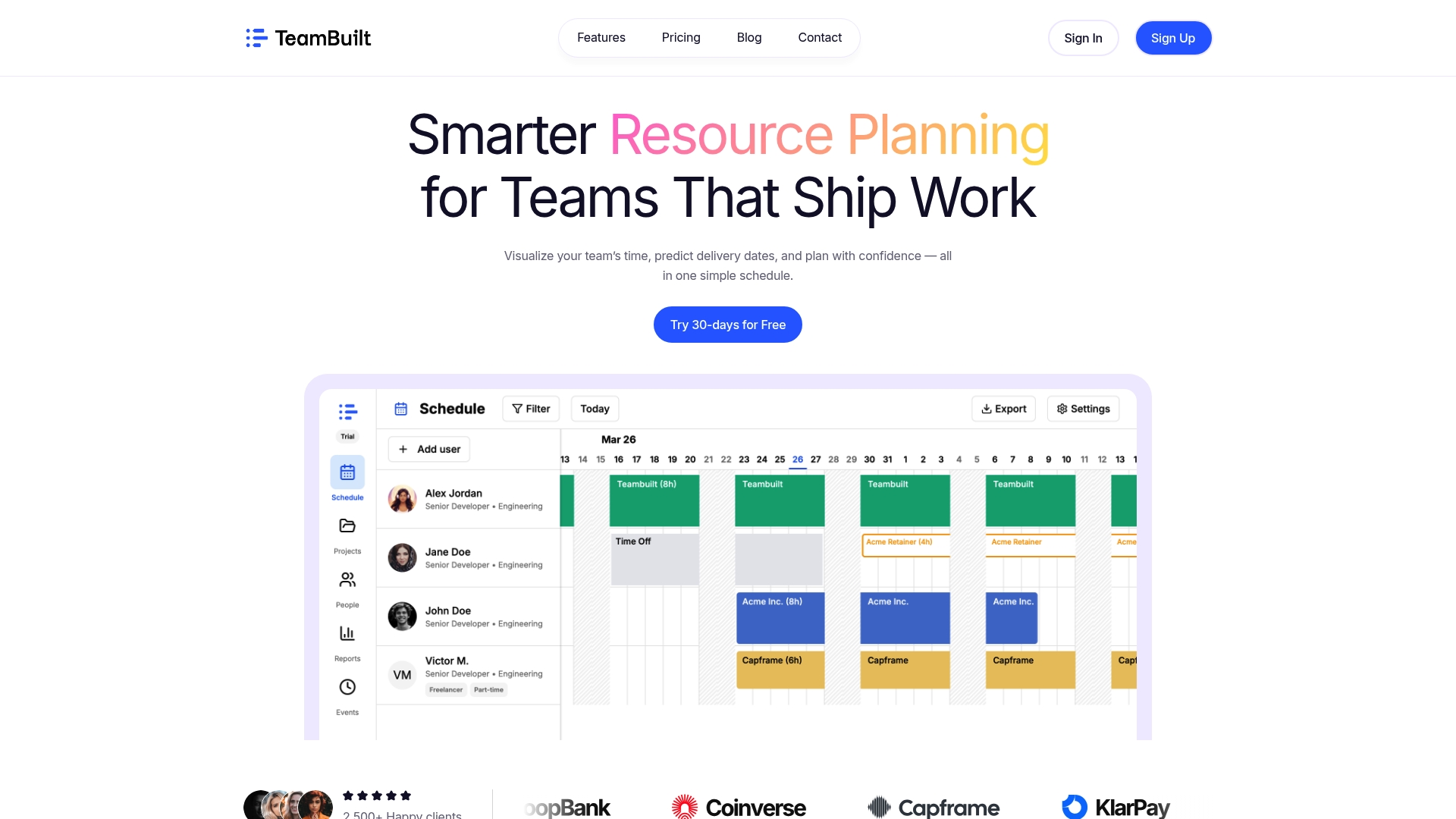
Teambuilt gives project managers and team leads real-time visibility into team capacity and assignments across every project and person in one place. You can track planned and ad hoc work, visualize capacity with color-coded indicators, forecast delivery dates based on actual availability, and rebalance assignments without leaving the platform. It replaces spreadsheets and disconnected workflows with a single source of truth your whole team can trust. Whether you are managing a growing startup or coordinating across multiple departments, Teambuilt is designed to make workload tracking a daily practice rather than a monthly fire drill.
FAQ
What is workload tracking in project management?
Workload tracking is the continuous process of monitoring task assignments and remaining capacity across your team to confirm work is distributed sustainably. Unlike time tracking, it focuses on forward-looking visibility rather than recording hours after the fact.
How is workload tracking different from workload visualization?
Workload tracking collects and monitors capacity data in real time. Workload visualization converts that data into dashboards, heatmaps, and charts so managers can interpret and act on it quickly. Tracking is the data layer; visualization is the communication layer.
What are the main benefits of workload tracking?
The core benefits include improved resource allocation, early bottleneck detection, reduced team burnout, and more accurate delivery forecasting. Teams that track workload consistently tend to deliver more predictably and retain high performers longer.
Why do workload tracking systems often produce inaccurate data?
The most common cause is untracked ad hoc work. Slack requests, informal favors, and unplanned reviews consume real capacity but rarely appear in task management systems, creating a systematic gap between recorded and actual workload.
How often should teams review workload data?
Daily or near-daily monitoring through short standups works better than weekly reviews because it catches imbalances before they become missed deadlines. Continuous tracking reveals trends that periodic snapshots miss entirely.
Recommended




