Centralized planning tools for smarter team management

Most project managers believe their spreadsheet system is working fine until a missed deadline or a double-booked resource proves otherwise. Fragmented tools create invisible bottlenecks that compound over time, quietly draining team capacity and eroding delivery predictability. Enterprise resource planning platforms emerged precisely because scattered data costs organizations more than they realize. This guide breaks down what centralized planning tools actually are, how they compare to other models, which features matter most, and how to implement them without the usual growing pains.
Table of Contents
Key Takeaways
| Point | Details |
|---|---|
| Unified data boosts efficiency | Centralized planning tools replace scattered resources with a single, accessible system for project teams. |
| Hybrids offer best results | Growing teams see the best mix of speed and control with hybrid blends of central and local planning. |
| ROI is measurable | Companies experience significant gains in speed, accuracy, and bottom-line savings when switching to centralized models. |
| Feature choice matters | Top-performing tools provide visual overviews, AI forecasting, and integration options for evolving needs. |
| Change management is key | Success depends on solid implementation, staff buy-in, and ongoing process measurement. |
What are centralized planning tools?
A centralized planning tool is software that pulls all relevant project data, including resources, deadlines, budgets, and team capacity, into one accessible system. Instead of chasing updates across five different apps and three spreadsheet tabs, everyone works from the same live picture. That single source of truth is what separates a real planning platform from a glorified task list.
Old approaches break down fast as teams grow. Scattered spreadsheets go stale the moment someone edits a local copy. Misaligned calendars mean two teams book the same designer on the same sprint. Duplicated effort creeps in when no one knows what the other department already built. These are not minor inconveniences. They are structural problems that compound with every new hire and every new client.
Enterprise resource planning research confirms that centralized tools create a single source of truth across projects, resources, timelines, and financials. For project-focused professional services teams, that visibility is the difference between reactive firefighting and proactive delivery.
Here is what a mature centralized planning tool typically includes:
-
Visual capacity planning: See who is available, who is overloaded, and when gaps open up
-
Resource assignment tracking: Assign people to projects and monitor utilization in real time
-
Real-time status dashboards: Get a live view of project health without chasing status emails
-
Financial visibility: Track budgets and forecasted costs alongside delivery timelines
-
Integration layer: Connect with existing tools so data flows automatically
| Feature | Spreadsheet approach | Centralized planning tool |
|---|---|---|
| Data freshness | Manual, often stale | Real-time, auto-updated |
| Resource visibility | Siloed per manager | Cross-team, unified view |
| Conflict detection | Reactive, after the fact | Proactive, flagged early |
| Reporting speed | Hours of manual work | Instant dashboard pull |
“The moment your team grows past ten people, a spreadsheet stops being a planning tool and starts being a liability.”
For a deeper look at how centralized operations insights translate into practice, the implementation principles from enterprise operations teams apply directly to growing agencies and startups.
Centralized vs. decentralized vs. hybrid planning
Not every organization needs the same planning model. Understanding the three main approaches helps you choose the right fit before you invest in tooling.
Centralized planning means all decisions and data flow through one system or team. It offers strong governance and consistency, but centralized models are slower for local decisions because every change requires approval or input from the center. This works well for large enterprises with stable workflows but can suffocate a fast-moving startup.
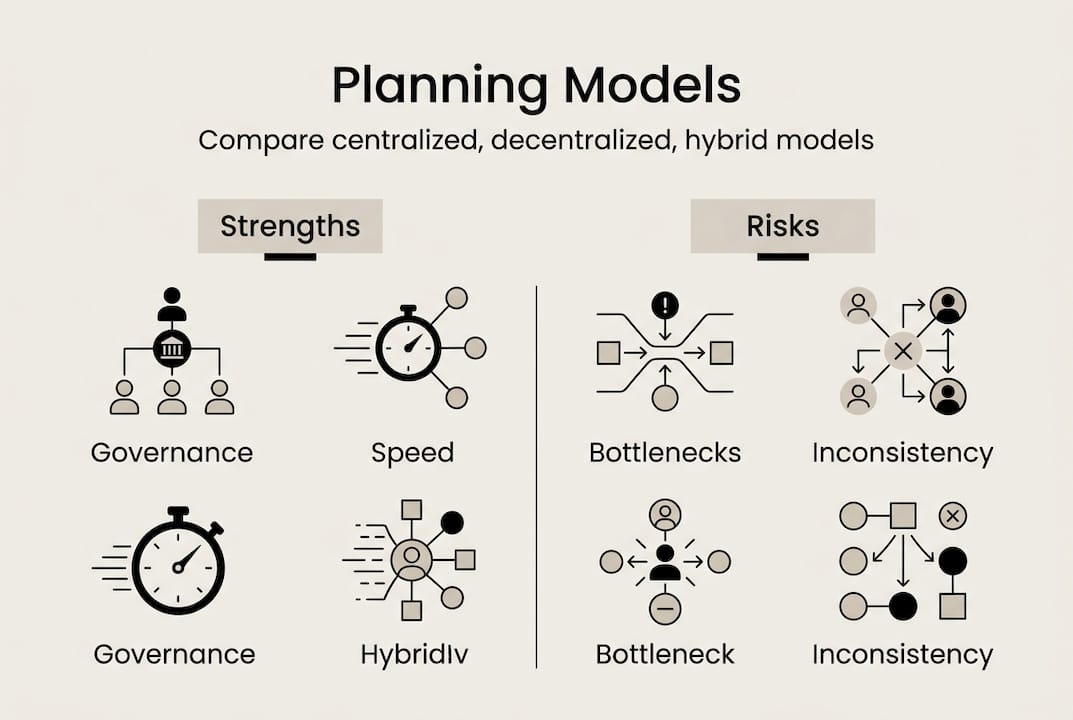
Decentralized planning pushes decision-making to individual teams or departments. Speed improves, but consistency suffers. Without a shared view, two teams can easily work at cross-purposes, and leadership loses visibility into overall capacity and risk.
Hybrid planning blends both. Central oversight handles resource allocation, financial tracking, and cross-team coordination, while individual teams retain autonomy over day-to-day task management. For hybrid planning for growing teams, this balance is almost always the right answer.
Best practices for centralized operations confirm that startups and agencies need hybrid models to balance control with agility, and that too much centralization creates the very bottlenecks you were trying to eliminate.
| Model | Best for | Main risk |
|---|---|---|
| Centralized | Large enterprises, regulated industries | Slow local decisions |
| Decentralized | Small, independent teams | Loss of visibility and consistency |
| Hybrid | Growing startups and agencies | Requires clear governance rules |
Signs you are over-centralizing: every small decision requires a meeting, team leads feel micromanaged, and delivery speed drops as the organization grows. Signs you are under-centralizing: no one knows overall capacity, projects conflict for the same resources, and leadership is always surprised by delays.
For a practical comparison of centralized vs decentralized authority in real organizations, the tradeoffs become very clear very quickly.
Pro Tip: Start with a hybrid model even if your team is small. Building centralized visibility early is far easier than retrofitting it after you have scaled to 50 people and six concurrent projects.
Essential features of effective centralized planning tools
Knowing you need a centralized tool is one thing. Knowing which features actually move the needle is another. Here are the capabilities that matter most for growing teams.
-
Real-time dashboards: Leadership and project managers need a live view of project status, resource load, and upcoming risks without waiting for a weekly report.
-
Visual resource allocation: A timeline or Gantt-style view showing who is assigned where and when prevents double-booking before it happens.
-
Scenario modeling: The ability to run “what if” simulations, such as adding a new client or losing a team member, lets you plan proactively instead of reactively.
-
AI-assisted forecasting: Predictive tools that flag delivery risks based on current capacity and historical velocity give teams a meaningful head start.
-
Native integrations: A planning tool that does not connect to your existing stack creates a new silo. Open APIs and pre-built integrations are non-negotiable.
-
Flexible permissions: Different roles need different access. Project managers, clients, and executives should each see what is relevant to them.
Platforms like Silberwal Plasch demonstrate that top tools can double coordination speed and meaningfully boost utilization rates across complex project portfolios. That kind of impact is not accidental. It comes from features designed specifically for multi-team environments.
A common mistake among experienced users is over-optimizing for utilization. Pushing every team member to 100% capacity looks efficient on paper but eliminates the buffer needed to absorb scope changes, sick days, or urgent client requests. Aim for 70 to 80% planned utilization and treat the rest as strategic capacity.

For capacity planning best practices that apply directly to agency and startup environments, the principles around buffer management and forecasting accuracy are especially relevant.
Pro Tip: Before evaluating any tool, list your top three planning pain points. If a vendor cannot show you exactly how their platform solves each one in a live demo, keep looking. A vendor management comparison can also help you structure your evaluation criteria.
Real-world impact: Benchmarks and ROI of centralized planning
Skeptics need numbers, not promises. The evidence for centralized planning is strong and comes from organizations across industries and sizes.
Silberwal Plasch case data shows measurable results including doubled coordination speed, significant utilization gains, and accuracy improvements that reduce costly rework. Cora PPM implementations have been linked to portfolio value improvements in the range of $500 million. These are not edge cases. They reflect what happens when teams replace fragmented workflows with a unified planning layer.
| Metric | Before centralized planning | After centralized planning |
|---|---|---|
| Coordination speed | Slow, email-dependent | 2x faster with shared dashboards |
| Resource utilization | 55 to 65% average | 75 to 85% optimized |
| Reporting time | 4 to 8 hours per week | Under 30 minutes |
| Delivery predictability | Frequent surprises | Consistent, data-driven forecasts |
The benefits extend beyond speed and efficiency:
-
Time savings: Automated reporting and live dashboards eliminate hours of manual data gathering each week
-
Cost reduction: Better utilization means fewer idle hours and less emergency overtime
-
Accuracy gains: Real-time data reduces the errors that come from working off stale spreadsheets
-
Team morale: Clearer workload visibility reduces the stress of constant context-switching and unclear priorities
“Organizations that implement centralized planning consistently report that the biggest surprise is not the efficiency gain, it is how much time leadership gets back for strategic thinking.”
For centralized planning results from enterprise implementations, the pattern is consistent: the ROI compounds over time as teams build better planning habits around the tool.
Implementing centralized planning: Steps and pitfalls
Rolling out a centralized planning tool is not just a software decision. It is an organizational change. Here is how to do it without derailing your team.
-
Conduct a needs assessment: Map your current workflows, identify where data lives today, and document your top three planning failures from the past six months.
-
Select features, not just vendors: Use your pain point list to evaluate tools. Prioritize real-time visibility, integration depth, and ease of adoption over feature count.
-
Migrate data carefully: Clean your data before importing it. Garbage in, garbage out. Assign one person to own data hygiene during the transition.
-
Train in phases: Do not train everyone at once. Start with project managers and operations leads, then roll out to team members once the core workflows are stable.
-
Set review cadences: Weekly check-ins during the first 90 days catch adoption gaps early and prevent bad habits from forming around the new tool.
Best practices for centralized operations highlight that transition risks include over-centralization and costly information processing delays. Mitigate both with clear governance rules, phased training, and KPIs that measure adoption alongside output.
For team onboarding tips specific to planning tool rollouts, focusing on quick wins in the first two weeks dramatically improves long-term adoption rates.
Key KPIs to track after go-live:
-
Resource utilization rate (target: 70 to 80%)
-
Project delivery accuracy (on-time vs. planned)
-
Reporting time per week (should drop significantly)
-
Cross-team conflict rate (double-bookings, missed handoffs)
Silberwal Plasch implementation data supports using weekly cadences and structured KPI reviews to sustain momentum after the initial rollout excitement fades.
Pro Tip: Resistance to new tools is almost always about fear of visibility, not the tool itself. Address it directly by showing team members how the platform protects their time rather than surveilling it. For broader change management strategies, framing the tool as a workload protector rather than a performance monitor makes adoption significantly smoother.
Centralize your planning with purpose-built tools
Everything covered in this guide points to one conclusion: generic tools and patched-together spreadsheets cannot keep pace with the complexity of a growing team. Purpose-built platforms reduce rollout friction, accelerate time to value, and give leadership the real-time visibility they need to make confident decisions.

TeamBuilt is built specifically for the challenges described here. Real-time scheduling, visual workload tracking, capacity forecasting, and cross-team coordination all live in one place. If you are ready to move from reactive firefighting to proactive planning, exploring modern centralized planning tools is the logical next step. The framework is clear. The evidence is strong. The only thing left is to act on it.
Frequently asked questions
How do centralized planning tools differ from project management apps?
Centralized planning tools unify resources, timelines, and financials into one platform, while most project management apps focus primarily on task tracking. The distinction matters because a single source of truth across data types enables decisions that task-level tools simply cannot support.
What’s the biggest risk with over-centralizing planning?
Too much centralization slows decision-making and creates bottlenecks, particularly for teams that need to move fast on local or client-specific needs. Over-centralization reduces agility in ways that often outweigh the governance benefits.
What features should I prioritize for a startup team?
Focus on visual capacity planning, AI-assisted forecasting, flexible permissions, and hybrid governance options that can scale with your headcount. Top planning platforms combine these features to support both speed and oversight simultaneously.
How do you measure the ROI of centralized planning?
Track project delivery accuracy, resource utilization rate, weekly reporting time, and cross-team conflict frequency as your core KPIs. Benchmark data consistently shows faster coordination, utilization gains of 15 to 20 percentage points, and significant cost savings within the first two quarters.
Recommended