Project timeline management guide: proven steps for SMBs

Picture this: your team is two weeks from launch, and someone finally admits the backend isn’t close to done. Sound familiar? Only 31-41% of projects finish on time and on budget, with the average schedule overrun hitting 43%. For startups and SMBs, that kind of slip doesn’t just hurt morale — it burns cash, damages client trust, and stalls growth. This guide walks you through the root causes of timeline failures, the frameworks that actually work for fast-moving teams, and the step-by-step practices that keep projects on track from kickoff to delivery.
Table of Contents
-
Why project timelines slip: The core challenges for startups and SMBs
-
How to create an actionable project timeline: Step-by-step guide
Key Takeaways
| Point | Details |
|---|---|
| Breakdown is key | Splitting work into small tasks and clear milestones keeps your team on track. |
| Use smart buffers | Adding a 20-30% buffer sharply reduces risk of delays without extra staff. |
| Balance resource load | 70-85% utilization targets keep teams efficient, not exhausted. |
| Review and adapt weekly | Regular milestone reviews catch issues early and improve outcomes over time. |
| Pick tools that scale | Choose platforms that align with your growth, not just today’s needs. |
Why project timelines slip: The core challenges for startups and SMBs
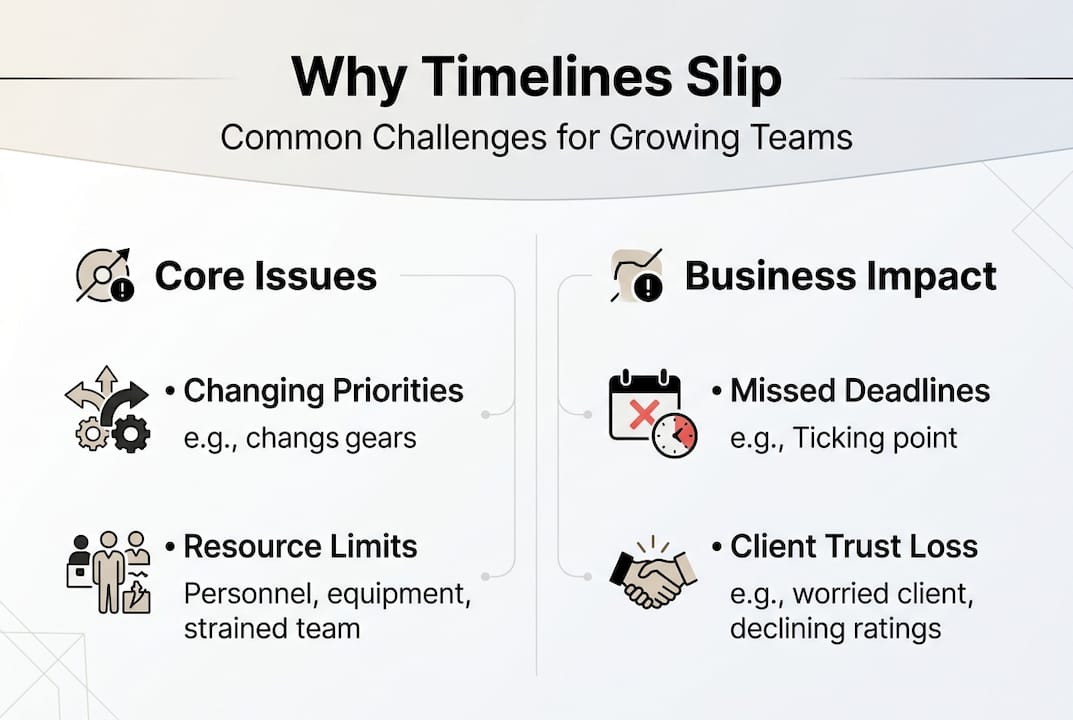
Growing companies face a specific kind of chaos. You’re scaling fast, your team wears multiple hats, and priorities shift weekly. That combination makes timeline management harder than it looks on paper.
The project management statistics are sobering: cost overruns, missed milestones, and scope explosions are the norm, not the exception. But here’s the thing — most of these failures are avoidable. The main causes of delays like unrealistic estimates and poor tracking are preventable with the right systems in place.
For startups and SMBs specifically, five root causes show up again and again:
-
Unrealistic estimates: Teams guess instead of using historical data, leading to timelines that collapse under real-world pressure.
-
Unclear ownership: Tasks without a named owner drift. Nobody escalates. Deadlines pass quietly.
-
Scope creep: New requests get added mid-sprint without adjusting the timeline or resources.
-
Poor dependency mapping: One delayed task blocks three others, and nobody sees it coming.
-
No buffer time: Schedules are built assuming everything goes right. They never do.
The business impact is real. Missed deadlines erode client confidence, trigger contract penalties, and force expensive crunch periods that burn out your best people. Using the right project management tools early in your planning process is one of the fastest ways to close these gaps before they become crises.
Frameworks and tools for effective timeline management
Not every methodology fits every team. The key is matching your approach to how your organization actually works, not how a textbook says it should.
For most startups and SMBs, Agile and hybrid approaches are preferred because they allow teams to adapt quickly without abandoning structure. Waterfall works well for fixed-scope projects with predictable deliverables. Gantt charts give executives a visual snapshot of progress. PERT (Program Evaluation and Review Technique) helps estimate time when uncertainty is high.
Here’s a quick comparison to help you choose:
| Framework | Best for | Key strength | Key weakness |
|---|---|---|---|
| Agile | Fast-moving, iterative work | Flexibility and speed | Hard to forecast end dates |
| Waterfall | Fixed-scope, sequential projects | Clear structure | Rigid, slow to adapt |
| Gantt | Visual planning and reporting | Easy to communicate | Can become outdated fast |
| Hybrid | Growing teams with mixed needs | Balance of structure and agility | Requires more coordination |
| PERT | High-uncertainty projects | Better time estimates | Complex to maintain |
For most SMB project approaches, a hybrid model wins. You get the sprint-based momentum of Agile for day-to-day execution, and the visual clarity of Gantt charts when you need to update leadership or clients.
When selecting scalable timeline management software, look for tools that support real-time updates, dependency tracking, and workload visibility. The best tools grow with your team rather than forcing you to migrate every 18 months.
Pro Tip: Use Agile sprints for your team’s weekly execution rhythm, and generate a Gantt view for stakeholder updates. You get speed and clarity without sacrificing either.
How to create an actionable project timeline: Step-by-step guide
A realistic timeline isn’t built in one sitting. It’s assembled carefully, with input from the people doing the actual work.
Follow these steps to build one that holds up:
-
Define the project scope clearly. Write down what’s in and what’s out before you touch a calendar.
-
Break work into small tasks. Each task should take one to three days and have a single owner. Anything larger is a phase, not a task.
-
Map dependencies. Identify which tasks must finish before others can start. This is where most timelines break down.
-
Use historical data for estimates. If your team took five days to build a similar feature last quarter, don’t estimate three days this time.
-
Add a 20-30% buffer to each phase. Not the whole project — each phase. This keeps slippage from compounding.
-
Set weekly milestone reviews. Don’t wait for the end of the project to find out you’re behind.
Here’s a simple reference for buffer sizing based on task complexity:
| Task complexity | Recommended buffer | Example |
|---|---|---|
| Low (routine work) | 10-15% | Writing standard reports |
| Medium (some unknowns) | 20-25% | Building a new feature |
| High (novel or complex) | 30-40% | Integrating a third-party API |
The steps to prevent delays all point to one truth: the more granular your planning upfront, the fewer surprises you face mid-project. Use your timeline breakdown guide to structure this process consistently across every project.

Pro Tip: Schedule a brief “review moment” at the 25% and 75% completion marks. These checkpoints catch issues early enough to fix them without derailing the whole timeline.
Mastering resource allocation and preventing burnout
A timeline is only as good as the people behind it. If your team is over-allocated, your schedule will slip no matter how well it’s designed.
The sweet spot for team utilization is 70-85%. Below that, you’re leaving capacity on the table. Above it, you’re accumulating hidden overtime and setting up for burnout. Data-driven allocation that prioritizes high-value tasks and uses software for visibility is the standard for high-performing teams.
Two techniques matter here:
-
Resource leveling: Delay or extend tasks to match available capacity. Use this when deadlines are flexible.
-
Resource smoothing: Adjust task assignments within the existing schedule to reduce peaks. Use this when deadlines are fixed.
Over-allocation is sneaky. It doesn’t show up as a crisis immediately. Instead, it shows up as slower output, more errors, and people quietly working nights and weekends. By the time you notice, you’ve already lost two weeks.
“The best resource plans aren’t built around ideal conditions. They’re built around real capacity, real constraints, and real people.”
Here’s a quick checklist for maintaining resource health across your projects:
-
Review individual utilization weekly, not monthly
-
Flag anyone consistently above 85% capacity
-
Redistribute tasks before burnout sets in, not after
-
Track planned versus actual hours to improve future estimates
-
Use resource allocation best practices to build this into your standard workflow
Pro Tip: Build a simple utilization dashboard that shows each team member’s load for the next two weeks. Visibility alone prevents most over-allocation problems.
Troubleshooting and preventing common timeline pitfalls
Even well-planned projects hit turbulence. The difference between teams that recover and teams that spiral is how fast they identify and respond to problems.
The three most damaging pitfalls are scope creep, missed dependencies, and communication lapses. Scope creep, missed dependencies, and over-allocation are fixable with daily standups and clear communication protocols — but only if you catch them early.
Here’s how to handle each one:
-
Scope creep: Create a formal change backlog. Every new request gets logged, estimated, and prioritized before it touches the active timeline. Nothing sneaks in.
-
Missed dependencies: Review your dependency map at every milestone. When one task slips, immediately check what it blocks and adjust downstream dates.
-
Communication lapses: Run 15-minute daily standups focused on blockers, not status updates. The goal is to surface problems before they compound.
“A missed dependency caught on Monday costs an hour to fix. The same dependency caught on Friday costs a week.”
One underrated fix: replace binary “done/not done” tracking with percentage complete. When a task shows 80% complete for three days in a row, that’s a signal something is stuck. Percentage tracking gives you early warning that binary status never provides.
Use timeline risk mitigation tools that surface these signals automatically, so you’re not relying on team members to self-report problems they may not even recognize yet.
Pro Tip: Set a rule that any task stuck at the same percentage for more than two days triggers an automatic check-in. This one habit catches more problems than any status report.
Measuring success: Metrics to track and lessons to apply
You can’t improve what you don’t measure. After each project, the teams that get better are the ones that look honestly at what happened and build that learning into the next cycle.
Effective management cuts delays by 30-40%, and high-performing teams are 2.5 times more likely to finish on time. That gap doesn’t come from talent alone — it comes from systems.
Track these four metrics on every project:
-
On-time delivery rate: What percentage of milestones and final deadlines did you hit?
-
Budget accuracy: How close was your final spend to the original estimate?
-
Team utilization: Did your team stay in the 70-85% range, or did you consistently over or under-allocate?
-
Customer satisfaction: Did the client or internal stakeholder feel the project met their expectations?
After each project, run a retrospective. Keep it short — 30 minutes is enough. Ask three questions: What went well? What slipped? What do we change next time? Document the answers and share them with the team.
Here’s a simple tracking table to use across projects:
| Metric | Target | Actual | Action if missed |
|---|---|---|---|
| On-time delivery | 90%+ | Track per project | Review estimation process |
| Budget accuracy | Within 10% | Track per project | Audit scope and buffers |
| Team utilization | 70-85% | Track weekly | Rebalance assignments |
| Retrospective held | Every project | Yes/No | Schedule before project closes |
The project timeframe statistics consistently show that continuous improvement compounds over time. Teams that run retrospectives and revise their estimation process outperform those that don’t, quarter after quarter.
Supercharge your timeline management with TeamBuilt
Everything covered in this guide — breaking down tasks, mapping dependencies, tracking utilization, catching scope creep early — works best when it lives in one place your whole team can see. Scattered spreadsheets and disconnected tools are where good plans go to die.

TeamBuilt’s project timeline platform brings real-time scheduling, workload visualization, and resource capacity tracking into a single workspace built for growing teams. You can forecast delivery dates based on actual availability, spot over-allocation before it becomes burnout, and give every stakeholder a clear view of where things stand. If you’re ready to replace the chaos of manual planning with a system that scales with your team, TeamBuilt is built exactly for that.
Frequently asked questions
What makes project timeline management different for startups and SMBs?
Startups and SMBs need flexible, fast-adapting timelines because priorities shift quickly and resources are limited. Unlike larger firms with fixed processes, startups need agility over rigid plans to stay competitive.
How much buffer time should I add to my project schedule?
Add a 20-30% buffer to each project phase to account for risks and inevitable delays. Applying it per phase prevents slippage in one area from cascading across the entire schedule.
What tools help startups manage complex timelines?
Hybrid Agile-Gantt software like TeamBuilt, Asana, or monday.com offers visualization plus flexibility for growing teams. Hybrid Agile with Gantt gives you sprint-based execution with clear visual reporting for stakeholders.
What is the most common reason projects overrun deadlines?
The biggest causes are unrealistic estimates and poor tracking, both of which are avoidable. Unrealistic estimates and poor tracking account for the majority of preventable project delays across industries.
Recommended