Step-by-step team scheduling: optimize projects fast



TL;DR:
- Proper scheduling reduces conflicts, improves delivery predictability, and saves managerial time.
- Building schedules with confirmed availability and task dependencies prevents delays and rework.
- Using strategic automation and visualization tools boosts efficiency, morale, and project success.
Managers spend over 3 hours every week just on scheduling, and when the process breaks down, projects slip, budgets blow out, and people burn out. For startups and SMBs running lean teams across multiple workstreams, that’s a compounding problem. A single missed dependency or double-booked resource can delay delivery by days or weeks. The good news is that most teams aren’t far from getting this right. A structured, repeatable approach to team scheduling cuts conflicts, improves delivery predictability, and frees up your time for higher-value work. This guide walks you through exactly that, from prep to publish to ongoing optimization.
Table of Contents
- What you need before you start team scheduling
- Step-by-step process for effective team scheduling
- Avoiding common scheduling pitfalls and real-world fixes
- Recommended team scheduling software and tools for SMBs
- Why team scheduling success is now strategy, not just admin
- How Teambuilt can supercharge your team scheduling
- Frequently asked questions
Key Takeaways
| Point | Details |
|---|---|
| Prep is critical | Collect confirmed availabilities and templates before scheduling to avoid most issues. |
| Follow proven steps | A clear, sequential process minimizes conflicts and boosts on-time, on-budget delivery. |
| Use the right tools | Dedicated scheduling tools and automation save time and prevent costly errors. |
| Publish early | Sending out schedules 1–2 weeks ahead can cut callouts by 20% or more. |
| Continuous improvement | Treat scheduling as strategic and regularly adapt your approach for better results. |
What you need before you start team scheduling
Now that you know why it matters, here’s everything you should have on hand before diving into scheduling. Jumping straight into building a schedule without the right inputs is one of the most common mistakes project managers make. You end up revising constantly, chasing people for availability, and discovering conflicts after the fact.
Start by gathering these core inputs:
| Input | Why it matters |
|---|---|
| Full resource list | Know who is available and in what capacity |
| Skills matrix | Match the right person to the right task |
| Confirmed availability | Block off time off, part-time hours, and leave |
| Project or shift templates | Speed up recurring schedule builds |
| Demand forecast | Understand workload volume before assigning |
| Time-off requests | Avoid last-minute gaps and compliance issues |
Before you touch a single time slot, collect the following:
- Confirmed availability from every team member, including part-time constraints
- Approved time-off requests and any upcoming leave
- Skills and certifications relevant to the work
- Project scope or shift requirements for the period you’re scheduling
- Templates from previous similar schedules
Prioritizing confirmed availability before building your schedule eliminates roughly 80% of conflicts before they start. That single habit alone saves most teams hours of rework every week.

Pro Tip: Build a simple availability form and send it at least two weeks before each scheduling period. Teams that do this cut their scheduling revision cycles dramatically and reduce no-shows by 20 to 30%.
Once you have your inputs, map out demand by role. How many hours of design work does this sprint need? How many support agents are required per shift? Answering these questions before you open your scheduling tool is what separates reactive scheduling from proactive planning. For more on this, streamlining your scheduling workflow and applying team capacity planning strategies are both worth reviewing before you start.
Step-by-step process for effective team scheduling
With all your prep in place, here’s how to build your actual schedule, step by step. This process works whether you’re managing project-based work or recurring operational shifts.
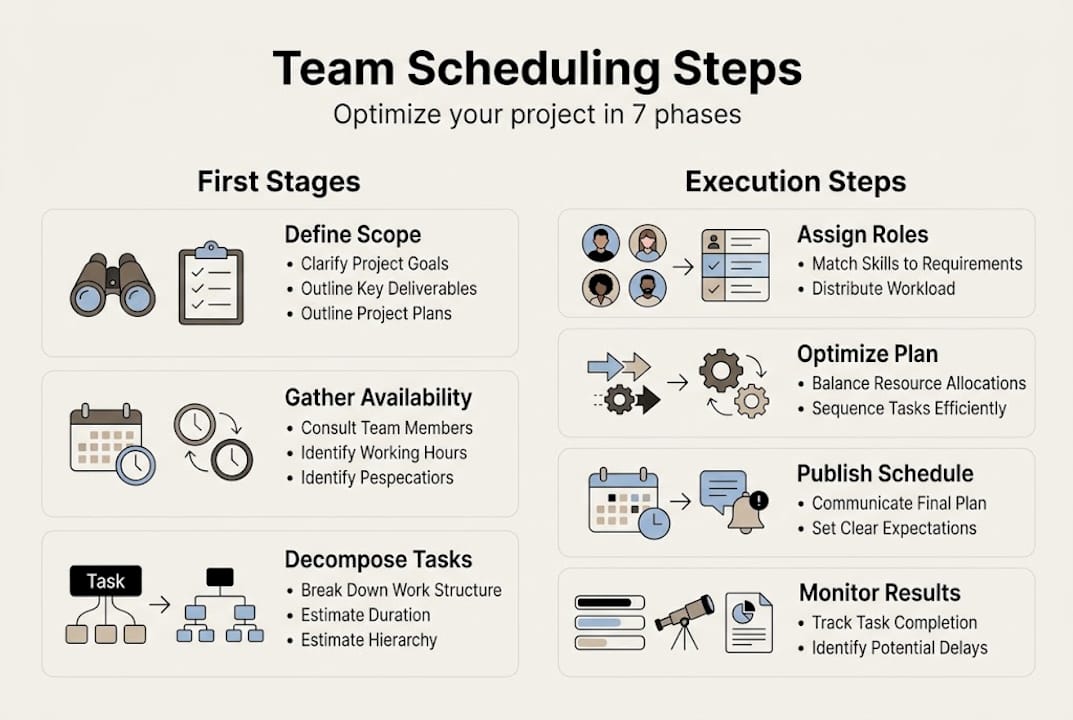
- Define scope and needs. Clarify what work needs to happen, how many hours it requires, and what roles are involved. Don’t skip this even for recurring schedules.
- Map tasks or shifts. Break work into discrete units. For projects, these are tasks with durations. For operations, these are shifts with coverage requirements.
- Identify dependencies. Flag which tasks can’t start until others finish. Missed dependencies are a leading cause of cascading delays.
- Assign resources. Match people to tasks based on skills, availability, and current load. Keep utilization at or below 80% to leave room for interruptions.
- Optimize the schedule. Look for conflicts, gaps, and overloads. Adjust assignments before publishing.
- Baseline and publish. Lock in the schedule and share it with the team at least 7 to 14 days in advance.
- Track and adjust. Monitor progress against the baseline and update as things shift.
This sequential scheduling process of defining, decomposing, assigning, optimizing, baselining, publishing, and monitoring is the backbone of reliable delivery. A solid resource scheduling guide can help you apply this to resource-heavy environments.
| Factor | Operations scheduling | Project scheduling |
|---|---|---|
| Primary unit | Shift | Task |
| Key constraint | Coverage minimums | Dependencies |
| Flexibility | Moderate | Lower |
| Replanning frequency | Weekly | Per milestone |
For project timeline management best practices, the same logic applies: plan before you assign, and always confirm availability at the time of assignment, not just at the start of the project.
Pro Tip: Apply saved templates for repeat project types or recurring weekly schedules. Then build in a 10 to 15% time buffer for every schedule period. Teams that do this consistently hit deadlines at a much higher rate than those operating at 100% capacity.
Avoiding common scheduling pitfalls and real-world fixes
Even with the right process, issues will crop up. Here’s how to spot and solve the most costly scheduling problems.
The most frequent scheduling pain points include resource double-booking, scope creep, overtime, absences, and unfair shift distribution. Each one has a direct operational cost. Double-booking leads to missed deadlines. Scope creep blows out timelines. Overtime drives burnout and attrition. And unfair shift distribution tanks team morale fast.
“Poor scheduling is responsible for over 50% of project delays, according to PMI research. It’s not a minor inefficiency. It’s a structural risk.”
Here’s a practical checklist for catching and fixing the most common problems:
- Double-booking: Use scheduling software with conflict detection. Visual timelines make overlaps obvious at a glance.
- Missed dependencies: Map task relationships before assigning. Review the dependency chain every time scope changes.
- Absenteeism: Build 10 to 15% buffer into every schedule. Maintain a short list of cross-trained team members who can cover.
- Overtime creep: Monitor utilization weekly. If anyone is consistently above 85%, redistribute or escalate.
- Shift unfairness: Rotate less desirable shifts systematically. Transparency in scheduling builds trust.
Automation makes a real difference here. AI-assisted scheduling tools reduce planning time by roughly 15 minutes per meeting or scheduling session. Publishing schedules early cuts callouts by 20 to 30%. For optimizing resource allocation and workflow, and for centralized team management, both approaches reduce the manual overhead that leads to these problems in the first place.
Recommended team scheduling software and tools for SMBs
If you want to streamline or scale, choosing the right tool matters. Here are top options tailored for SMBs and fast-growing teams.
Float, Resource Guru, monday.com, Asana, and Teamwork consistently rank as the best choices for startups and SMBs, each with different strengths depending on your team’s focus.
| Tool | Best for | Starting price | Standout feature |
|---|---|---|---|
| Float | Resource scheduling | ~$6/user/month | Visual capacity planning |
| Resource Guru | Availability management | ~$4.16/user/month | Clash detection |
| monday.com | Full project management | ~$9/user/month | Workflow automation |
| Asana | Task and project tracking | Free tier available | Timeline and dependency view |
| Teamwork | Client-based project work | ~$5.99/user/month | Billable time tracking |
AI-powered scheduling tools can reduce planning time by up to 40%, which is a meaningful gain for lean operations teams. When evaluating tools, look for:
- Visual scheduling so workload is easy to read at a glance
- Integration support with your existing tools (Slack, Jira, Google Calendar)
- Mobile access for field teams or remote workers
- AI or automation features for recurring schedule generation and conflict flagging
For a deeper look, best project management tools for SMBs covers what to prioritize by team size and workflow type. And if you’re thinking about reducing manual work more broadly, workflow automation for project managers is a practical next read.
Why team scheduling success is now strategy, not just admin
Most people still think of scheduling as a necessary chore. Something to get through before the real work starts. That framing is costing startups and SMBs more than they realize.
Scheduling is actually a force multiplier. When you get it right, your team delivers faster, your clients trust you more, and your people stay longer. Resource Guru users report a 25% efficiency gain after modernizing their scheduling practices. That’s not a marginal improvement. That’s a competitive edge.
The teams that treat scheduling as a strategic function do a few things differently. They baseline every schedule so they can measure variance. They review utilization weekly, not just when something breaks. They use AI to handle repetitive logic and focus human judgment on the exceptions. And they treat scheduling data as a feedback loop, not just a task list.
For scalable project workflows, this mindset shift is what separates teams that grow smoothly from those that hit a wall every time headcount increases.
Pro Tip: Don’t treat your schedule as a set-and-forget document. A 15-minute weekly review of actuals versus plan compounds into dramatically better delivery performance over a quarter.
Neglecting scheduling discipline is one of the quietest reasons growing companies miss opportunities. Projects run late, clients get frustrated, and the root cause never gets diagnosed because nobody looked at the schedule data closely enough.
How Teambuilt can supercharge your team scheduling
Ready to turn strategy into action? Discover how Teambuilt helps you implement these winning scheduling methods.

The Teambuilt platform is built specifically for growing startups and SMBs that need real-time visibility into team capacity, workload, and project timelines without the complexity of enterprise tools. With Teambuilt resource planning features, you get visual scheduling, utilization tracking, and cross-team coordination in one place. No more scattered spreadsheets or missed dependencies hiding in someone’s inbox. If you’re ready to replace manual scheduling with a smarter, faster system, Teambuilt gives your team the structure to deliver consistently and scale with confidence.
Frequently asked questions
What are the top steps in team scheduling for startups?
Define your work scope, gather confirmed availability, sequence tasks or shifts, assign resources at 80% utilization, publish the schedule early, and adjust as the project progresses. A step-by-step approach of defining, decomposing, assigning, baselining, and monitoring keeps delivery on track.
How far in advance should you publish a team schedule?
Aim to publish schedules 7 to 14 days in advance. Publishing early cuts callouts by 20 to 30% and supports compliance with fair scheduling regulations in many regions.
Which team scheduling software is best for small businesses?
Float and Resource Guru are the most budget-friendly options for resource scheduling, while monday.com and Asana offer stronger project management features. The best tools for SMBs depend on whether your priority is shift coverage or task-based project delivery.
How can AI tools improve team scheduling?
AI automates conflict detection, generates schedule suggestions based on availability, and reduces planning time by up to 40%. This frees project managers to focus on decisions that require judgment rather than data entry.
What’s the biggest cause of project delays in team scheduling?
Poor scheduling causes over 50% of project delays according to PMI research. Missed dependencies and resource conflicts are the two most common root causes that structured scheduling directly addresses.
Recommended